Another dead RT6

This unit is the eMyWay system, also referred to as RT6, RNEG2, or WIPNAV+ for the Peugeot platform and made by Magneti Marelli.
Main Features: The eMyWay colour satellite navigation has high resolution mapping, Bluetooth Telephone & Audio Streaming supported profiles, USB support for Media files & CD
clinch
Posts: 8
Joined: 26 Jul 2024, 20:09

Another dead RT6

Unread post by clinch »

Hey everyone, and greetings from Norway!
I know most of you are probably watching the Olympic opening ceremony in Paris at this very moment, but I'll go ahead anyway :wink:

It's my first post on the forum, so I hope I'm not stepping on too many toes when I say that I absolutely hate the RT6 system in my DS5.

I've been driving around with a presumably dead LCD-screen for a while, after it gradually died on me last year. The typical intermittent CD-slot "whir" that signals it's looking for a bootable media, black display, no reverse camera and parking sensors etc. After a while I decided to pull the F6A fuse from the fuse panel, so I didn't have to lose my last shred of sanity listening to the CD-slot whirring every 10 seconds.

Today I pulled the trigger on trying to repair the situation, as my wife is looking to sell her car and will likely be driving the good 'ol DS5 a lot more in the future. I bought a MicroSD card and a USB stick, and followed this very well written guide https://www.frenchcarforum.co.uk/forum/ ... hp?t=63227
and this great video


on the subject. Only thing I did different was unhook the positive terminal on the battery beforehand.

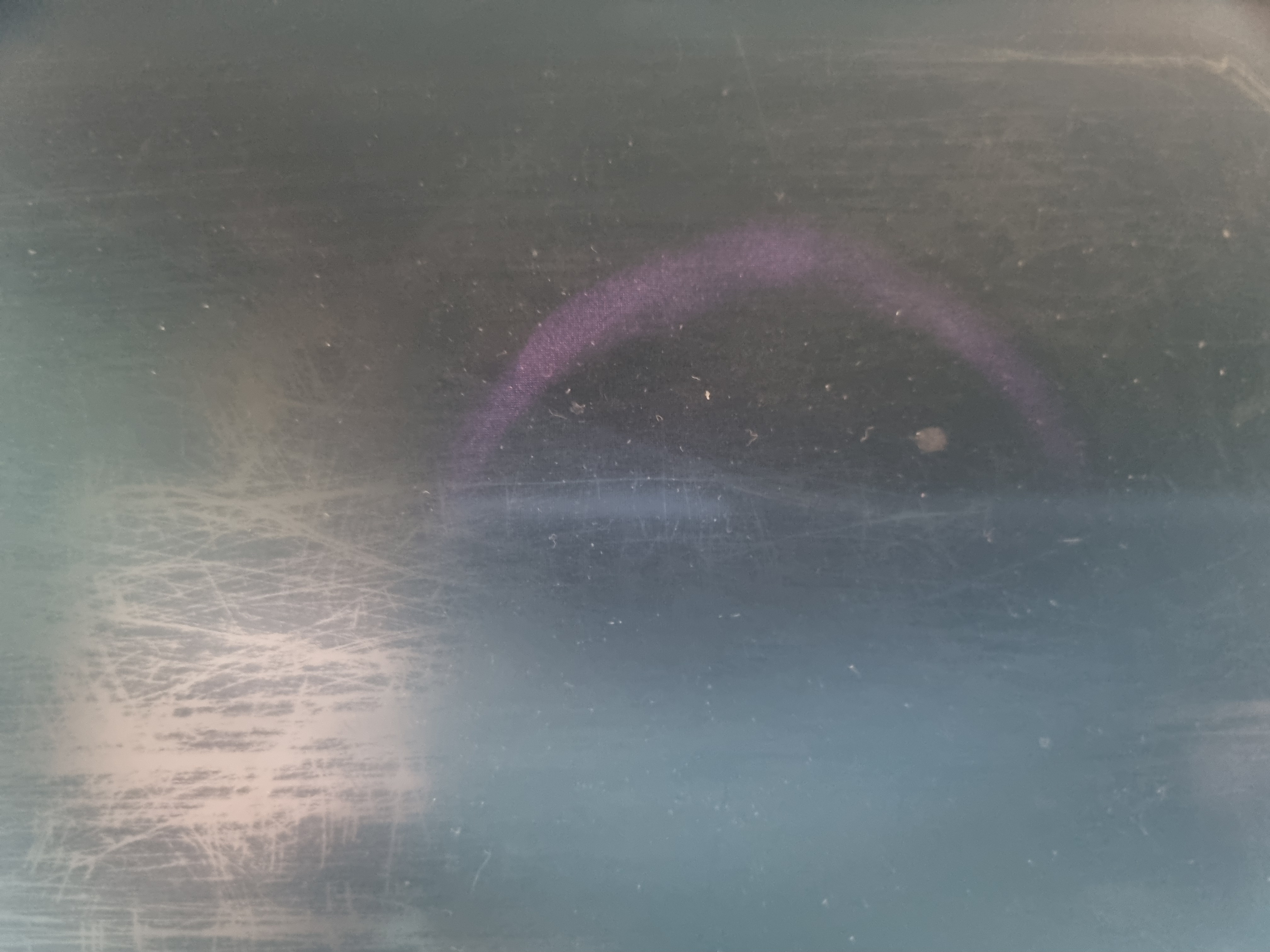
After the new MicroSD was inserted, the plastic trimmings installed back on and the 15A fuse for the RT6 plugged in, I fired the car up to find myself in the exact same situation as before. No difference in the LCD screen, just a black "light" on it with a burnt in purple-ish ring in the middle. Whirring was still present. At this time I plugged in the, correctly prepared, USB stick to no avail. Dead screen and whirring still present.

The way I see it I have two possible routes from here,
  • A) try to get my hands on a new LCD screen, or even possibly a complete RT6, or
  • B) swap out the whole system for Android Auto or other equivalent.


Now, I'm tempted to go with route B, but at the same time hesitant because I'd like to retain the button functions (volume control in center console and steering wheel, call and hang up bluetooth calls, etc.)
Any two cents are more than welcome!

Other possibly pertinent information
  • I don't think it should matter much, but I couldn't get my hands on a 8GB MicroSD, as they're so rare nowadays, so I had to go for a 64GB one.
  • I let the car idle for about 30 minutes to observe if there was any change in behavior. There wasn't.
  • My VIN is VF7**************[VIN obfuscated, can be read by forum staff]
Last edited by GiveMeABreak on 26 Jul 2024, 21:11, edited 1 time in total.
User avatar
GiveMeABreak
(Donor 2016)
Posts: 42019
Joined: 15 Sep 2015, 19:38
x 6955

Re: Another dead RT6

Unread post by GiveMeABreak »

Hi and welcome.

That behaviour likely means it's too late for replacement of the MicroSD card. It's likely that there's another internal issue with the motherboard and it's lost critical operating files. I assume you have followed the guide and used the 2.86 firmware to create the new partitions and install the operating system on the new MicroSD card?

If so, it's probably toast and PSA don't repair - they can send them off but the price is considerable. So your options are to look for a second hand unit of the exact same part number as listed on the back of your existing unit, replace with a new unit or replace with something else. Be aware if thinking of replacing with a non-PSA unit like an android system, you'll lose access to all the configuration options, parking assistance etc. that you are currently facing.
Please note, I'm no longer active on the Forum, so won't respond to messages.

Marc
clinch
Posts: 8
Joined: 26 Jul 2024, 20:09

Re: Another dead RT6

Unread post by clinch »

Thank you @GiveMeABreak, I was afraid I would lose those functions. It's a crap situation, but at the moment I have zero functions anyway, so I might go on with an Android system.

Regarding the MicroSD, I just popped it in straight from the packaging. I was under the impression that the RT6 would take care of the partitioning itself. If the old MicroSD was salvageable and not scrambled, I would have cloned it over to the new one, but it wasn't doable at all. I had not downloaded any new firmware, just copied the Mirascript files (primarily RT6_USERCOM.CMD) to the USB and wiped the Windows files from it.

Do you advise that I try again with a different approach?
User avatar
Paul-R
Moderating Team
Posts: 8970
Joined: 07 May 2009, 16:24
x 1860

Re: Another dead RT6

Unread post by Paul-R »

Senior forum member @Wheeler fitted an Android unit into his X7 I think. He also managed to retain most of the remote functions as well.
As I get older I think a lot about the hereafter - I go into a room and then wonder what I'm here after.

Inside every old person is a young person wondering what the hell happened.

"Trying is the first step towards failure" ~ Homer J Simpson
User avatar
Paul-R
Moderating Team
Posts: 8970
Joined: 07 May 2009, 16:24
x 1860

Re: Another dead RT6

Unread post by Paul-R »

Try a 32GB SD card instead of the 64GB one.
As I get older I think a lot about the hereafter - I go into a room and then wonder what I'm here after.

Inside every old person is a young person wondering what the hell happened.

"Trying is the first step towards failure" ~ Homer J Simpson
clinch
Posts: 8
Joined: 26 Jul 2024, 20:09

Re: Another dead RT6

Unread post by clinch »

@Paul-R, thank you for the information. Since everything communicates over CAN it could turn out to be a real hassle, but I might be able to identify some button presses and stuff if I hook up a Diagbox eventually? Also, I might try the 32GB MicroSD, it's just a real PIA to get all that plastic off. But then I might also inspect the 64GB card to see if there has been any new information put on it.
User avatar
GiveMeABreak
(Donor 2016)
Posts: 42019
Joined: 15 Sep 2015, 19:38
x 6955

Re: Another dead RT6

Unread post by GiveMeABreak »

No, you can't just bung in a new MicroSD card and copy over your user files alone. You must have the V2.86 firmware files extracted onto a FAT 32 formatted USB and insert this, so the system can attempt to boot, partition the new MicorSD card and install the OS. It cannot do this without having the firmware as the routine to do this is embedded in the firmware.

This is all detailed in the guide and it seems you have skipped this... and yes, you cannot use a 64 Gb MicroSD card. Stick to a 32Gb version.
Please note, I'm no longer active on the Forum, so won't respond to messages.

Marc
clinch
Posts: 8
Joined: 26 Jul 2024, 20:09

Re: Another dead RT6

Unread post by clinch »

@GiveMeABreak, gotcha'. I was looking for a sign of life from the LCD display, like partitioning or something in the least. I will go ahead with a 32GB MicroSD and the proper firmware. You don't happen to have a firmware I can try out?
User avatar
GiveMeABreak
(Donor 2016)
Posts: 42019
Joined: 15 Sep 2015, 19:38
x 6955

Re: Another dead RT6

Unread post by GiveMeABreak »

See your Private Messages.
Please note, I'm no longer active on the Forum, so won't respond to messages.

Marc
clinch
Posts: 8
Joined: 26 Jul 2024, 20:09

Re: Another dead RT6

Unread post by clinch »

Thank you Marc, I will give this another go tomorrow and keep everyone posted :wink:
clinch
Posts: 8
Joined: 26 Jul 2024, 20:09

Re: Another dead RT6

Unread post by clinch »

After giving it a go, the screen isn't any more alive than before unfortunately. Here is an image of what I see when the screen "comes to life".

Image

If you look closely you can see the purple-ish semi-circle on the middle of the LCD-screen.
Image

What I've tried
  • Removing the initial 8GB MicroSD. I can see the files on the MicroSD in Windows explorer, but it's impossible to read further data.
  • Swapped in a fresh 64GB MicroSD, and ran a firmware update via USB, while following this guide viewtopic.php?t=75448.
    After plugging in the USB with the firmware, the whirring from the CD-rom stops for approx. 20 minutes, the unit then restarts and goes back to the above screen with the same whirring. If I leave the USB in, it seems to begin a new firmware update cycle, with the same unit restart in the end.
  • Removed the 64GB MicroSD, inspected for files in Windows explorer. It was completely empty.
  • Installed a 32GB MicroSD, and did the same firmware update via USB as described above, with the exact same results.
At no time what so ever, has the screen displayed anything other than what you can see above. Except when it's completely powered off, of course.

The fact that the 64GB MicroSD had no files written to it at all concerns me. I have tried the firmware update with two different USB-sticks (one completely fresh from the packaging).
User avatar
GiveMeABreak
(Donor 2016)
Posts: 42019
Joined: 15 Sep 2015, 19:38
x 6955

Re: Another dead RT6

Unread post by GiveMeABreak »

The default size of these cards was 8Gb, but most replaced these with a 16Gb card. I can't advise on whether a larger capacity card will work or whether this is interfering with the partitioning.

If it then still does not work and you are using the correct format (FAT32 - other file systems will NOT work) on the USB drive containing the firmware then your unit may be beyond help at this stage.

The operating system is not windows based - it is a special form of Unix that is used for automotive systems.
Please note, I'm no longer active on the Forum, so won't respond to messages.

Marc
clinch
Posts: 8
Joined: 26 Jul 2024, 20:09

Re: Another dead RT6

Unread post by clinch »

Copy that Marc. Both of the USB-sticks were formatted to FAT32. I'm of the understanding that the LCD-screen itself is dead, so if it's possible to source a new one, I might try replacing just that...
clinch
Posts: 8
Joined: 26 Jul 2024, 20:09

Re: Another dead RT6

Unread post by clinch »

Also, just so check it off the list.

Is it viable to source a used RT6 and LCD-screen from a "totaled" vehicle? I assume it's not exactly plug-and-play.

If anyone has experience with such a "transplant", I would love to hear more about it.
User avatar
GiveMeABreak
(Donor 2016)
Posts: 42019
Joined: 15 Sep 2015, 19:38
x 6955

Re: Another dead RT6

Unread post by GiveMeABreak »

It's difficult to determine whether there is no output because there's no output to display (as the head unit is without Operating System), or whether the screen is indeed faulty. If considering changing it, check the part number on the rear of the screen and match it exactly. There's no programming needed. Or if you want to know the parts we can help, but please see below:

We can help if you need an original genuine part number, part diagram or factory build sheet and can't already find the info you need on the Forum. For this service, we do ask for a membership upgrade for official parts data as we are in turn charged for this. It will cover you for future part number requests for up to 2 years, so excellent value.

If interested, links are below, then provide your vehicle's VIN in full, which will be masked automatically when you submit your post.
A response to your question by a Forum Admin requiring parts or specific vehicle information requires you
to have made a current contribution
(Min. £10 / €11.48 or equivalent) to the Forum.
To Upgrade Your Membership & Donate Click Here

For Further Information About Vehicle Parts and VIN Numbers Click Here
Please note, I'm no longer active on the Forum, so won't respond to messages.

Marc