
No. On the NAC Wave 3/4 with an HD touchscreen you'll always see the system lateral bars with the temperature.Solarriors wrote: 04 Aug 2026, 13:04 So is it not possible to modify the system to project the Android Auto on the 2/3 of the 12" screen ?
PSA NAC RCC Updates
-
rui_saraiva

- Posts: 136
- Joined: 15 Feb 2023, 10:31
- x 64
Re: PSA NAC RCC Updates
-
rui_saraiva
- Posts: 136
- Joined: 15 Feb 2023, 10:31
- x 64
Re: PSA NAC RCC Updates
The blue screen was because you tried to update the firmware or just appeared out of nowhere? In the latter case, you can just prepare a USB flash drive with a *map* update, without really needing to install it - insert the USB flash drive, wait for the install confirmation and just say no. The system should be fine.Raizer wrote: 07 Aug 2026, 23:16 Hi all
Has anyone had any success doing an update on a NAC Wave 2 that's sitting on the blue screen telling you systems loading on demand, I initially tried the update and seemed to work but then I got an error message and been sat on blue screen for ages, when ever I try to update it again I just get hardware not compatible error. any help or ideas to try would be appreciated.
But because you tried to update the firmware, the map update trick probably doesn't work anymore. You need to use another USB flash drive with the latest firmware AND the license key (if you use the official software you don't need to worry about any of this).
-
rui_saraiva
- Posts: 136
- Joined: 15 Feb 2023, 10:31
- x 64
Re: PSA NAC RCC Updates
You have an NAC_EUR_WAVE2 and you can download the license for the 22.08.90.52_NAC_r0 firmware (UpdateID/mediaVersion 001315031666020829) and for your UIN at:enechifor99 wrote: 15 Aug 2026, 17:19 Hello!
I have a Peugeot 308 form 2017, which sound, bluetooth, radio, wifi, not working, but sometimes, when i read error codes or random, it starts giving audio, but not from radio. I try to rewrite the firmware, but i am getting firmware error. I dont know where from to download license, maybe thats the problem. The UID is 0D011003A9D4EA9B89D5 , the VIN is VF3**************[VIN obfuscated, can be read by forum staff]**************[VIN obfuscated, can be read by forum staff] . Please help:(
https://majestic-web.mpsa.com/mjf00-web ... D4EA9B89D5
Do you have the Arkamys/Focal amplifier installed on your car? There's a common problem with that optional equipment when the amplifier detects an out-of-spec impedance in any of the speakers, it just cuts out the audio to protect the system. It's usually a loose contact/humidity in one of the speakers. There also a firmware update for that amplifier ECU (not related to this infotainment system updates) that relaxes the impedance range.
-
rui_saraiva
- Posts: 136
- Joined: 15 Feb 2023, 10:31
- x 64
Re: PSA NAC RCC Updates
You can't use the official Peugeot Update software to update non-European maps. You'll find the Latin America "latam" maps on my page, either for the NAC_EUR_WAVE2 (pre-facelift, 8" touchscreen), or the NAC_EUR_WAVE4 (facelift, 10" touchscreen), respectively versions 27.0.0-r0 or 13.0.0-r0, both from late 2024.rafaeljonathas wrote: 17 Aug 2026, 11:38 Hi! could anyone help, please?
Actually, i'm from Brasil, Sao Paulo. My car is a 2023 3008 Peugeot.
Ive been trying to update its maps for some time now, since it originally came with EUR syst, but i never got it right.
I took it a few times to dealership for quick reviews and they never seem to help. I thought it'd make more sense if i tried alone,
but ended up without my gps. Took it to the dealers again and they fixxed the gps but coudnt update the maps since Peugeot Update Program
came with an error. I'm searching everywhere but starting to give up on updating.
Is there anything else i can do?
Sorry for bad english.
You just need to extract the .tar file to a FAT32-formatted USB flash drive.
-
rui_saraiva
- Posts: 136
- Joined: 15 Feb 2023, 10:31
- x 64
Re: PSA NAC RCC Updates
You don't need the firmware license if your car has a ATB/BTA module or any way to verify the license online - either connect your car to a WiFi network or Bluetooth phone tethering.owl wrote: 25 Aug 2026, 17:25No. Actually when you download software from Rui's link, you need to create and add license file additionally. There is no unlocked features. When you do it via MY Citroen or My Peugeot application with you VIN number, license file comes automatically.Solarriors wrote: 25 Aug 2026, 03:42 @rui_saraiva
Is there a difference from downloading from your site and from the Citroen software ? Unlocked features or licenses ?
-
rui_saraiva
- Posts: 136
- Joined: 15 Feb 2023, 10:31
- x 64
Re: PSA NAC RCC Updates
In your case (NAC_EUR_WAVE4 system), using the Peugeot Update software, you can only update the maps. The 44.06.44.22_NAC-r0 firmware version has an expired signing certificate and is impossible to install. You can install the 44.07.33.32_NAC-r0 version, but you have to use the link on my page. Except for bug fixes, you shouldn't expect any new features in those firmware versions - if it ain't broken, don't fix it.denis1304 wrote: 01 Sep 2026, 18:09 Hello
I have 42.03.31.32_NAC-r0 on my Peugeot 508 hybrid, from 2022.
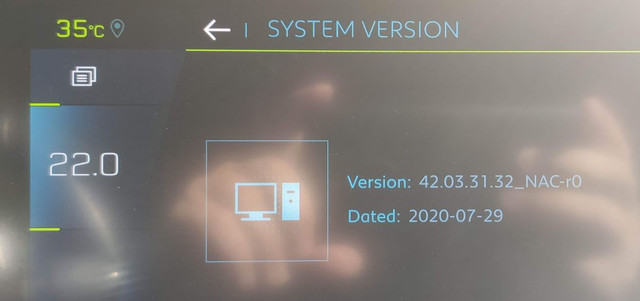
Is there any meaningful difference between 42.03.31.32_NAC-r0 and 44.06.44.22_NAC-r0 or 44.07.33.32_NAC-r0? Currently everything works OK.
The MyPeugeot app is telling me I can update FW to the 44.06.44.22_NAC-r0 version and maps to the 20.0.0-r0 version.
Can I just update maps I'm interested in without updating the FW to 44.06.44.22_NAC-r0 or 44.07.33.32_NAC-r0?
How long does it take to update FW and a map for one country?
Thanks
You can just update the maps.
The firmware update takes about 30 minutes and the map about 45-60 minutes. In NAC_EUR_WAVE3 and NAC_EUR_WAVE4 systems, you can individually choose the countries to install, but it really doesn't make much difference (it verifies all the files anyway). The system is prepared to update the maps whilst driving.
-
Raizer
- Posts: 4
- Joined: 25 Feb 2026, 16:18
Re: PSA NAC RCC Updates
I have tried multiple USB drives using both the official app and downloading it from you site with license from app, non seem to work all i get is hardware not compatible. if you have any further advise my cars VIN VF7**************[VIN obfuscated, can be read by forum staff]rui_saraiva wrote: 02 Sep 2026, 22:39The blue screen was because you tried to update the firmware or just appeared out of nowhere? In the latter case, you can just prepare a USB flash drive with a *map* update, without really needing to install it - insert the USB flash drive, wait for the install confirmation and just say no. The system should be fine.Raizer wrote: 07 Aug 2026, 23:16 Hi all
Has anyone had any success doing an update on a NAC Wave 2 that's sitting on the blue screen telling you systems loading on demand, I initially tried the update and seemed to work but then I got an error message and been sat on blue screen for ages, when ever I try to update it again I just get hardware not compatible error. any help or ideas to try would be appreciated.
But because you tried to update the firmware, the map update trick probably doesn't work anymore. You need to use another USB flash drive with the latest firmware AND the license key (if you use the official software you don't need to worry about any of this).
-
denis1304
- Posts: 10
- Joined: 10 Feb 2023, 10:49
Re: PSA NAC RCC Updates
Thanks for the replay.rui_saraiva wrote: 02 Sep 2026, 23:18
In your case (NAC_EUR_WAVE4 system), using the Peugeot Update software, you can only update the maps. The 44.06.44.22_NAC-r0 firmware version has an expired signing certificate and is impossible to install. You can install the 44.07.33.32_NAC-r0 version, but you have to use the link on my page. Except for bug fixes, you shouldn't expect any new features in those firmware versions - if it ain't broken, don't fix it.
You can just update the maps.
The firmware update takes about 30 minutes and the map about 45-60 minutes. In NAC_EUR_WAVE3 and NAC_EUR_WAVE4 systems, you can individually choose the countries to install, but it really doesn't make much difference (it verifies all the files anyway). The system is prepared to update the maps whilst driving.
Can you clarify one more thing for me...
When I started updating maps, it asked me if I wanted to update maps, I selected YES.
Then it gave me an option to select map-eur and install... Here I stopped the process since I wasn't sure if I would be able to select just the countries I want to update.
Is there an option to select wanted countries after I select map-eur and install?
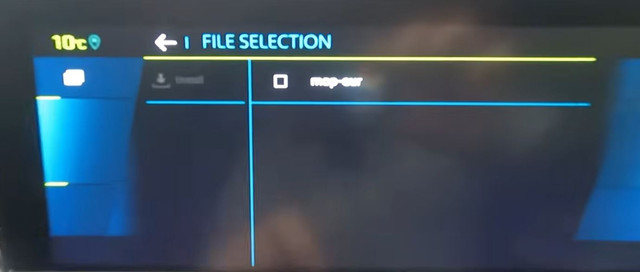
Thank you
-
rui_saraiva
- Posts: 136
- Joined: 15 Feb 2023, 10:31
- x 64
Re: PSA NAC RCC Updates
Because I'm not a staff member, I cannot see any VIN posted in this forum - they are all obfuscated.Raizer wrote: 03 Sep 2026, 09:21I have tried multiple USB drives using both the official app and downloading it from you site with license from app, non seem to work all i get is hardware not compatible. if you have any further advise my cars VIN VF7**************[VIN obfuscated, can be read by forum staff]**************[VIN obfuscated, can be read by forum staff]rui_saraiva wrote: 02 Sep 2026, 22:39The blue screen was because you tried to update the firmware or just appeared out of nowhere? In the latter case, you can just prepare a USB flash drive with a *map* update, without really needing to install it - insert the USB flash drive, wait for the install confirmation and just say no. The system should be fine.Raizer wrote: 07 Aug 2026, 23:16 Hi all
Has anyone had any success doing an update on a NAC Wave 2 that's sitting on the blue screen telling you systems loading on demand, I initially tried the update and seemed to work but then I got an error message and been sat on blue screen for ages, when ever I try to update it again I just get hardware not compatible error. any help or ideas to try would be appreciated.
But because you tried to update the firmware, the map update trick probably doesn't work anymore. You need to use another USB flash drive with the latest firmware AND the license key (if you use the official software you don't need to worry about any of this).
Your system is in a state that it needs the actual license file on the USB flash drive. It's also in a state that is impossible to verify if the UIN (Unique Identification Number) of the head unit is the correct one (the VIN-UIN pair is correct in the PSA/Stellantis database). It is not common, but it happened before - a few posts above, there's precisely one of those cases with the member @tunahan12.
-
rui_saraiva
- Posts: 136
- Joined: 15 Feb 2023, 10:31
- x 64
Re: PSA NAC RCC Updates
Yes, the list of countries is in the next screen. Remember that you cannot install just one country that you didn't select in any previous installation - you've to reinstall all of the countries you want.denis1304 wrote: 03 Sep 2026, 09:32Thanks for the replay.rui_saraiva wrote: 02 Sep 2026, 23:18
In your case (NAC_EUR_WAVE4 system), using the Peugeot Update software, you can only update the maps. The 44.06.44.22_NAC-r0 firmware version has an expired signing certificate and is impossible to install. You can install the 44.07.33.32_NAC-r0 version, but you have to use the link on my page. Except for bug fixes, you shouldn't expect any new features in those firmware versions - if it ain't broken, don't fix it.
You can just update the maps.
The firmware update takes about 30 minutes and the map about 45-60 minutes. In NAC_EUR_WAVE3 and NAC_EUR_WAVE4 systems, you can individually choose the countries to install, but it really doesn't make much difference (it verifies all the files anyway). The system is prepared to update the maps whilst driving.
Can you clarify one more thing for me...
When I started updating maps, it asked me if I wanted to update maps, I selected YES.
Then it gave me an option to select map-eur and install... Here I stopped the process since I wasn't sure if I would be able to select just the countries I want to update.
Is there an option to select wanted countries after I select map-eur and install?
Thank you
-
denis1304
- Posts: 10
- Joined: 10 Feb 2023, 10:49
Re: PSA NAC RCC Updates
I'm sorry, but I don't quite understand what you mean by saying, "Remember that you cannot install just one country that you didn't select in any previous installation - you've to reinstall all of the countries you want."rui_saraiva wrote: 03 Sep 2026, 20:11Yes, the list of countries is in the next screen. Remember that you cannot install just one country that you didn't select in any previous installation - you've to reinstall all of the countries you want.denis1304 wrote: 03 Sep 2026, 09:32Thanks for the replay.rui_saraiva wrote: 02 Sep 2026, 23:18
In your case (NAC_EUR_WAVE4 system), using the Peugeot Update software, you can only update the maps. The 44.06.44.22_NAC-r0 firmware version has an expired signing certificate and is impossible to install. You can install the 44.07.33.32_NAC-r0 version, but you have to use the link on my page. Except for bug fixes, you shouldn't expect any new features in those firmware versions - if it ain't broken, don't fix it.
You can just update the maps.
The firmware update takes about 30 minutes and the map about 45-60 minutes. In NAC_EUR_WAVE3 and NAC_EUR_WAVE4 systems, you can individually choose the countries to install, but it really doesn't make much difference (it verifies all the files anyway). The system is prepared to update the maps whilst driving.
Can you clarify one more thing for me...
When I started updating maps, it asked me if I wanted to update maps, I selected YES.
Then it gave me an option to select map-eur and install... Here I stopped the process since I wasn't sure if I would be able to select just the countries I want to update.
Is there an option to select wanted countries after I select map-eur and install?
Thank you
Let's say I want to update Albania. On the next screen I select Albania, and it will update just Albania? What will happen to the rest of the countries already installed in the navigation?
Thanks
-
rui_saraiva
- Posts: 136
- Joined: 15 Feb 2023, 10:31
- x 64
Re: PSA NAC RCC Updates
@denis1304: All other countries will be removed.
-
Solarriors
- Posts: 110
- Joined: 14 Nov 2025, 01:55
- x 7
Re: PSA NAC RCC Updates
I mean the Wave 2, Primary screen, and I meant recode softwarerui_saraiva wrote: 02 Sep 2026, 22:32No. On the NAC Wave 3/4 with an HD touchscreen you'll always see the system lateral bars with the temperature.Solarriors wrote: 04 Aug 2026, 13:04 So is it not possible to modify the system to project the Android Auto on the 2/3 of the 12" screen ?
Last edited by Solarriors on 07 Sep 2026, 06:33, edited 1 time in total.
-
Solarriors
- Posts: 110
- Joined: 14 Nov 2025, 01:55
- x 7
Re: PSA NAC RCC Updates
OK here is an interesting question.
The Voice Command seem to be tied to the language of the country, which is not English for me, irrespective of the system menu language, which is English, so I can't use. Is there a way to change the "car's country" to an English speaking country ?
The Voice Command seem to be tied to the language of the country, which is not English for me, irrespective of the system menu language, which is English, so I can't use. Is there a way to change the "car's country" to an English speaking country ?
-
Solarriors
- Posts: 110
- Joined: 14 Nov 2025, 01:55
- x 7
Re: PSA NAC RCC Updates
It means you cannot add countries piece by pieces after one installation. Every installation combination replaces entirely the previous installation. You have to install the full combination you want at once.denis1304 wrote: 04 Sep 2026, 08:22 I'm sorry, but I don't quite understand what you mean by saying, "Remember that you cannot install just one country that you didn't select in any previous installation - you've to reinstall all of the countries you want."