Lexia woes

This is the Forum for all your Citroen Technical Questions, Problems or Advice.
BenC5HDi
Not Mike
Posts: 588
Joined: 30 Nov 2015, 20:21
x 45

Re: Lexia woes

Post by BenC5HDi »

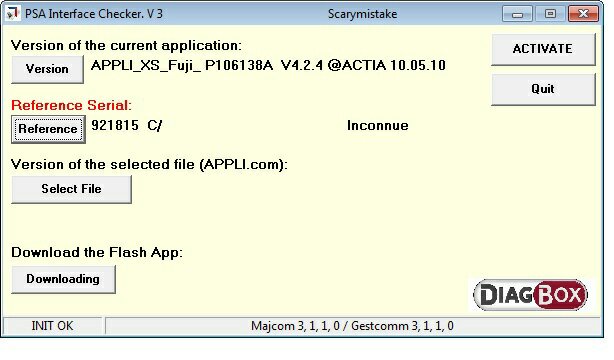
I have run the checker on my Lexia and the results are below.

If it's one I can flash, please can you direct me to the files please Marc. I've emailed you..
Image

Sent from my SM-N9005 using Tapatalk
User avatar
GiveMeABreak
(Donor 2016)
Posts: 41989
Joined: 15 Sep 2015, 19:38
x 6958

Re: Lexia woes

Post by GiveMeABreak »

Replying now Ben - give a few secs to upload the links....
Edit: Done
Please note, I'm no longer active on the Forum, so won't respond to messages.

Marc
BenC5HDi
Not Mike
Posts: 588
Joined: 30 Nov 2015, 20:21
x 45

Re: Lexia woes

Post by BenC5HDi »

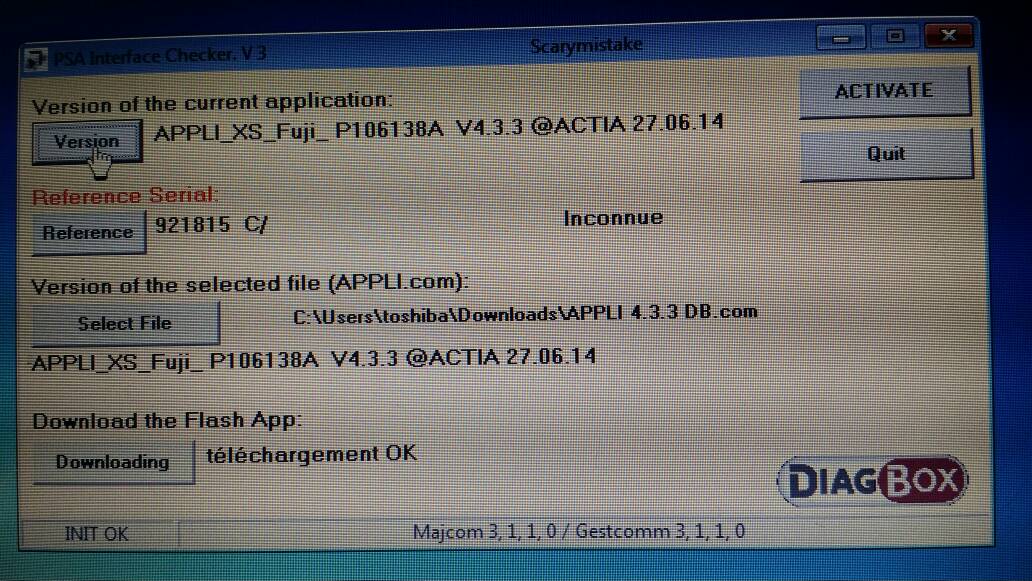
Great, thanks a lot Marc. I've flashed it, as per your suggestion of one step at a time up to v4.33

Image

I'll now reinstall DB7.02 and upgrade it to 7.15 and seen if it works this time.


Sent from my SM-N9005 using Tapatalk
BenC5HDi
Not Mike
Posts: 588
Joined: 30 Nov 2015, 20:21
x 45

Re: Lexia woes

Post by BenC5HDi »

Well, despite Marc's great help - Diagbox 7.15 now installed and activated, Lexia interface updated to 4.33, I still can't get any dialogue with any ECU - every single one comes up with NO. I suspect the cable between the Lexia and the socket is duff, as I get exactly the same result when I simply leave it unplugged.

I checked fuse F6 - the diagnostic socket fuse, it's ok but I replaced it anyway.

So, looks like my hardware is duff :( I'm even more inclined to think this as Hell Razor James Lexia worked fine on this vehicle a couple of weeks ago.

Damnit.

Sent from my SM-N9005 using Tapatalk
KP
Posts: 3980
Joined: 10 Jul 2006, 12:11
x 27

Re: Lexia woes

Post by KP »

If you suspect the cable then there is somewhere in the UK that makes ones hat work perfectly fine. Mine was like this with some ECU using the older 30pin breakout cable but once i spent the £25 on a replacement it's worked faultlessly :)
Hell Razor5543
(Donor 2023)
Posts: 14267
Joined: 01 Apr 2012, 09:47
x 3278

Re: Lexia woes

Post by Hell Razor5543 »

Well, Ben's cables work on my system, but when I try using his Lexia I cannot 'talk' to the ECUs. However, the firmware checker works. I know that my Lexia, the short USB cable and the interface cable work.
James
ex BX 1.9
ex Xantia 2.0HDi SX
ex Xantia 2.0HDi LX
ex C5 2.0HDi VTR
ex C5 2.0HDi VTR
ex C5 2.2HDi VTX+

Yes, I am paranoid, but am I paranoid ENOUGH?
Out amongst the stars, looking for a world of my own!
User avatar
Paul-R
Moderating Team
Posts: 9045
Joined: 07 May 2009, 16:24
x 1882

Re: Lexia woes

Post by Paul-R »

Two questions.

Have you tried your Lexia on another car?
Has your car been read by another Lexia? Failing that a generic reader? (You may have said so already, if so I apologise).
As I get older I think a lot about the hereafter - I go into a room and then wonder what I'm here after.

Inside every old person is a young person wondering what the hell happened.

"Trying is the first step towards failure" ~ Homer J Simpson
User avatar
Paul-R
Moderating Team
Posts: 9045
Joined: 07 May 2009, 16:24
x 1882

Re: Lexia woes

Post by Paul-R »

Cross posted with Hell Razor which partially answers my questions.
As I get older I think a lot about the hereafter - I go into a room and then wonder what I'm here after.

Inside every old person is a young person wondering what the hell happened.

"Trying is the first step towards failure" ~ Homer J Simpson
john
Posts: 308
Joined: 15 May 2012, 08:34
x 1

Re: Lexia woes

Post by john »

Image

Image
Citroen Xsara Picasso
Subaru Impreza WRX
Nissan Primastar
User avatar
GiveMeABreak
(Donor 2016)
Posts: 41989
Joined: 15 Sep 2015, 19:38
x 6958

Re: Lexia woes

Post by GiveMeABreak »

John - You have the revision B hardware - so are limited to the earlier versions of Diagbox 7. I don't have anything earlier than this now.

I've sent you a PM regarding the above.
Please note, I'm no longer active on the Forum, so won't respond to messages.

Marc
User avatar
xantia_v6
Forum Admin Team
Posts: 10771
Joined: 09 Nov 2005, 22:03
x 1367

Re: Lexia woes

Post by xantia_v6 »

I am trying to check the version and diagbox compatibility of my old Lexia interface.
When I run the PSA Interface Checker.exe file, I get as far as the language selection screen, and then the installer crashes.
I have an old copy of Lexia software (still working) installed on the same (XP) machine.
User avatar
GiveMeABreak
(Donor 2016)
Posts: 41989
Joined: 15 Sep 2015, 19:38
x 6958

Re: Lexia woes

Post by GiveMeABreak »

Once you've selected the language, there's nothing to say that it has installed (!) odd, I know,, but you should have 3 icons on your desktop - DRIVER, INTERFACE INSTALL and PSA INTERFACE CHECKER. It puts all these on the desktop.
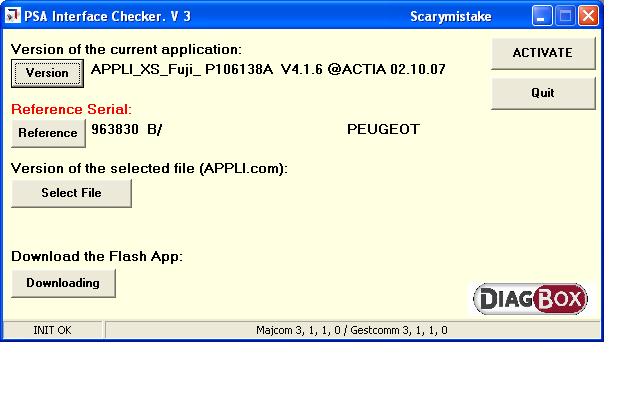
Ignore the first 2, just connect up your interface and launch the PSA checker. If there aren't any icons on the desktop, the executable file is here:
C:\APPLIC\LEXIA\MajAppCom\MajAppCom.exe
if this file is here, you can just create your own shortcut to it or launch directly. :wink:

If it isn't there, then try installing the programme as administrator (even if you are an admin).
Please note, I'm no longer active on the Forum, so won't respond to messages.

Marc
User avatar
GiveMeABreak
(Donor 2016)
Posts: 41989
Joined: 15 Sep 2015, 19:38
x 6958

Re: Lexia woes

Post by GiveMeABreak »

john wrote:Image
As there was no question in the post John, I'll just jump in and confirm you have the older blocked revision 'B' interface. You should be fine with Diagbox versions prior to V7 - or and a big or - you may get away with an early V7 - but it is hit and miss. If you don't need to upgrade your Actia, leave it as is. (I can't tell what car you have as you don't have it on your Avatar / profile :)
Please note, I'm no longer active on the Forum, so won't respond to messages.

Marc
User avatar
xantia_v6
Forum Admin Team
Posts: 10771
Joined: 09 Nov 2005, 22:03
x 1367

Re: Lexia woes

Post by xantia_v6 »

GiveMeABreak wrote:Once you've selected the language, there's nothing to say that it has installed (!) odd, I know,, but you should have 3 icons on your desktop - DRIVER, INTERFACE INSTALL and PSA INTERFACE CHECKER. It puts all these on the desktop.
That information was useful!

My interface is as old as I thought... I don't suppose that there is much chance of it working with a Peugeot 308?

Image
User avatar
GiveMeABreak
(Donor 2016)
Posts: 41989
Joined: 15 Sep 2015, 19:38
x 6958

Re: Lexia woes

Post by GiveMeABreak »

What year is the 308? Here's the thing - depending on the year, some of the ECU software may of been written after the older PP2000 software was written, so some ECUs may not be readable; so now in addition, we have the added problem that Revision 'B' clone interfaces were 'blocked' by PSA. The revision 'C' clones are ok and should work fine with the all the current line up of cars, with the exception of a few commercial PSA vehicles. There are some guys who say they can reflash the Revision B interfaces to revision C for a small fee - before you can upgrade to the later versions of Diagbox - which in turn supports some of the newer cars.

Also, your firmware is currently 4.1.6 and Diagbox 7.01/02 needs 4.3.0 - but not much point if your interface may not work with V7. Appologies if this is all a bit confusing!
Please note, I'm no longer active on the Forum, so won't respond to messages.

Marc