
Hi All
recently purchased a peugeot 307 5 door the central locking is not working at all i can unlock / lock drivers door with key boot sometimes opens both rear doors and front passenger door remain locked and cannot open from inside or outside tried taking deadlocking off on bsi through pp2000 and diagabox but still the same any advice on where to look
regards
mark
Peugeot 307 hdi central locking / deadlocking issue
-
gango67
- Posts: 56
- Joined: 14 Aug 2020, 16:51
- x 3
Peugeot 307 hdi central locking / deadlocking issue
Last edited by gango67 on 09 Aug 2021, 08:24, edited 1 time in total.
-
gango67
- Posts: 56
- Joined: 14 Aug 2020, 16:51
- x 3
Re: Peugeot 307 hdi central locking / deadlocking issue
Have pp2000 and diagabox diagnostic software aswell as peugeot workshop manual been through these without any sucsess
-
GiveMeABreak

- (Donor 2016)
- Posts: 41989
- Joined: 15 Sep 2015, 19:38
- x 6955
Re: Peugeot 307 hdi central locking / deadlocking issue
Have you tried the basics?
1) You say you have recently purchased it - so it's possible the remote key fob is not an original and has been replaced with an aftermarket one that does not have the correct circuitry for your specific car (this is not the first time we have seen this). If it is not using the correct frequency and transmission protocol the car won't respond via remote requests.
2) I take it you don't have a second fob - which may make point 1) more likely.
3) Try Re-synchronising the remote key fob. Put the key fob in the ignition, switch to accessories position and press the lock button within 10 seconds for a few seconds, release, and switch off ignition - try remote locking.
4) I would not change anything in your BSI - put the setting back as it was or you are going to be introducing new problems if you change the locking from deadlocking to simple locking.
5) Pop your VIN up here (automasked on post submission) and I'll check fuses / wiring once I know the exact model / system you have.
1) You say you have recently purchased it - so it's possible the remote key fob is not an original and has been replaced with an aftermarket one that does not have the correct circuitry for your specific car (this is not the first time we have seen this). If it is not using the correct frequency and transmission protocol the car won't respond via remote requests.
2) I take it you don't have a second fob - which may make point 1) more likely.
3) Try Re-synchronising the remote key fob. Put the key fob in the ignition, switch to accessories position and press the lock button within 10 seconds for a few seconds, release, and switch off ignition - try remote locking.
4) I would not change anything in your BSI - put the setting back as it was or you are going to be introducing new problems if you change the locking from deadlocking to simple locking.
5) Pop your VIN up here (automasked on post submission) and I'll check fuses / wiring once I know the exact model / system you have.
Please note, I'm no longer active on the Forum, so won't respond to messages.
Marc
Marc
-
gango67
- Posts: 56
- Joined: 14 Aug 2020, 16:51
- x 3
Re: Peugeot 307 hdi central locking / deadlocking issue
1 - that is a possibility i dont have a way of checking frequency although it should still work from the key in door unlocking all and also the button on dash so assuming this is not the problemGiveMeABreak wrote: 09 Aug 2021, 08:57 Have you tried the basics?
1) You say you have recently purchased it - so it's possible the remote key fob is not an original and has been replaced with an aftermarket one that does not have the correct circuitry for your specific car (this is not the first time we have seen this). If it is not using the correct frequency and transmission protocol the car won't respond via remote requests.
2) I take it you don't have a second fob - which may make point 1) more likely.
3) Try Re-synchronising the remote key fob. Put the key fob in the ignition, switch to accessories position and press the lock button within 10 seconds for a few seconds, release, and switch off ignition - try remote locking.
4) I would not change anything in your BSI - put the setting back as it was or you are going to be introducing new problems if you change the locking from deadlocking to simple locking.
5) Pop your VIN up here (automasked on post submission) and I'll check fuses / wiring once I know the exact model / system you have.
2 - no second fob
3 - have tried resyncing several times
4 - Changed back instantly after trying
5 - VF3**************[VIN obfuscated, can be read by forum staff]
Thanks for assistance have pulled up correct wiring diagrams i believe on peugeot workshop manuals
-
gango67
- Posts: 56
- Joined: 14 Aug 2020, 16:51
- x 3
Re: Peugeot 307 hdi central locking / deadlocking issue
also i had a citroen with very similar problem C3 that turned out that the central locking relay ( within BSI ) was faulty so i overcame that by pulsing voltage at doors to motor to unlock and switched off deadlocking in BSI so was assuming this was the same although i have sent voltage down the door wiring via the rear door connectors disconnected inside center pillar which was unsucsessful when doing actuator test i can here the lock motors ?
-
GiveMeABreak
- (Donor 2016)
- Posts: 41989
- Joined: 15 Sep 2015, 19:38
- x 6955
Re: Peugeot 307 hdi central locking / deadlocking issue
Ok, so next thing, have you checked:
Shunt Fuse in the BSI - make sure it is in customer position not Park Mode.
Check Fuse F2 and F15 in the BSI (for Front & Left Door Lock Assemblies)
Does the main central locking button in the car lock and open the doors?
Check the wiring inside the driver's door grommet (from the 'A' Pillar to the Door) - opening and closing the door over time can weaken the wires inside the protective grommet - you may have a break or a short.
6205P : Left-hand front lock deadlocking + command Relay (R4A)
6204P : Right-hand front lock locking + command (Relay R5B)
6206A / 6206B : Right-hand front lock deadlocking + command Relay (R6)
I would find it hard to imagine all the relays are shot.
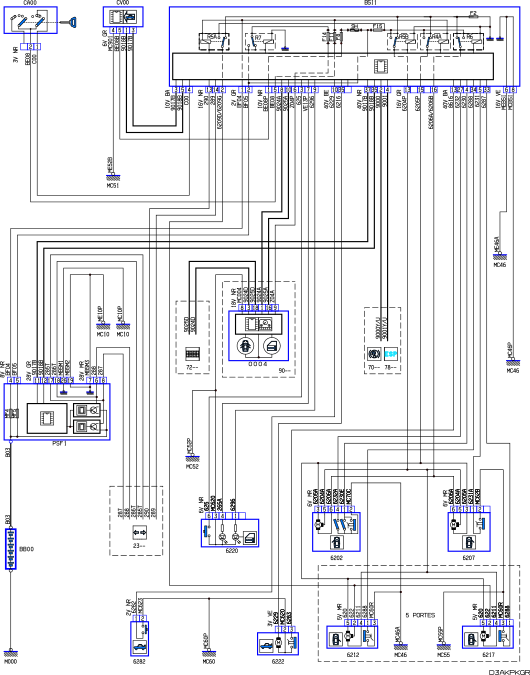
Shunt Fuse in the BSI - make sure it is in customer position not Park Mode.
Check Fuse F2 and F15 in the BSI (for Front & Left Door Lock Assemblies)
Does the main central locking button in the car lock and open the doors?
Check the wiring inside the driver's door grommet (from the 'A' Pillar to the Door) - opening and closing the door over time can weaken the wires inside the protective grommet - you may have a break or a short.
6205P : Left-hand front lock deadlocking + command Relay (R4A)
6204P : Right-hand front lock locking + command (Relay R5B)
6206A / 6206B : Right-hand front lock deadlocking + command Relay (R6)
I would find it hard to imagine all the relays are shot.
Please note, I'm no longer active on the Forum, so won't respond to messages.
Marc
Marc
-
gango67
- Posts: 56
- Joined: 14 Aug 2020, 16:51
- x 3
Re: Peugeot 307 hdi central locking / deadlocking issue
Thanks
thats the same wiring diagram i was working from firstly will check the shunt fuse is that F16 and how do i know customer or Park Mode ?
Checked both F2 & F15 in BSI all ok
Main Central Locking button on Dashboard will lock the drivers door only doesnt unlock drivers door i believe from memory has no effect unlocking passenger or rear doors ?
Have pinged for continuity on drivers door connector to relevant pins on BSI wiring loom plugs have continuity on all i should will try and check the grommet section
Many thanks
Mark
thats the same wiring diagram i was working from firstly will check the shunt fuse is that F16 and how do i know customer or Park Mode ?
Checked both F2 & F15 in BSI all ok
Main Central Locking button on Dashboard will lock the drivers door only doesnt unlock drivers door i believe from memory has no effect unlocking passenger or rear doors ?
Have pinged for continuity on drivers door connector to relevant pins on BSI wiring loom plugs have continuity on all i should will try and check the grommet section
Many thanks
Mark
-
gango67
- Posts: 56
- Joined: 14 Aug 2020, 16:51
- x 3
Re: Peugeot 307 hdi central locking / deadlocking issue
Just been to check Shunt Fuse was in Park position i have changed it to client position just connected BSI back together and Re-Connected Battery just going to give it 5 Mins to settle before reattempting Key Fob Sync and central locking
hopefully thats all it was
many thanks
Mark
hopefully thats all it was
many thanks
Mark
-
GiveMeABreak
- (Donor 2016)
- Posts: 41989
- Joined: 15 Sep 2015, 19:38
- x 6955
Re: Peugeot 307 hdi central locking / deadlocking issue
Get a torch and look on the plastic surround by the shunt fuse - it should say 'Client' or 'Parc'. Make shire it is shunted to the 'Client' position.
Re the interior locking button: from the manual... so yes pressing will lock or unlock the doors.
Locking/Unlocking from the inside:
Re the interior locking button: from the manual... so yes pressing will lock or unlock the doors.
Locking/Unlocking from the inside:
- Pressing button A permits locking or unlocking of the vehicle.
- The red warning light on the button comes on when the vehicle is locked and switches off when it is unlocked.
Please note, I'm no longer active on the Forum, so won't respond to messages.
Marc
Marc
-
gango67
- Posts: 56
- Joined: 14 Aug 2020, 16:51
- x 3
Re: Peugeot 307 hdi central locking / deadlocking issue
ThanksGiveMeABreak wrote: 09 Aug 2021, 11:17 Ok, so next thing, have you checked:
Shunt Fuse in the BSI - make sure it is in customer position not Park Mode.
Check Fuse F2 and F15 in the BSI (for Front & Left Door Lock Assemblies)
Does the main central locking button in the car lock and open the doors?
Check the wiring inside the driver's door grommet (from the 'A' Pillar to the Door) - opening and closing the door over time can weaken the wires inside the protective grommet - you may have a break or a short.
6205P : Left-hand front lock deadlocking + command Relay (R4A)
6204P : Right-hand front lock locking + command (Relay R5B)
6206A / 6206B : Right-hand front lock deadlocking + command Relay (R6)
I would find it hard to imagine all the relays are shot.
seem to be getting somewhere now after changing Shunt Fuse position i have managed to resync the keyfob and also the Info display is now not resetting itself after every ignition cycle still unable to unlock the other doors either by button in cab or the keyfob but can lock the drivers door and boot by keyfob once locked if i press unlock on the keyfob only the boot will unlock ?
when pressing the unlock on fob or dashboard have a clicking noise and only get actuation sound on locking
hopefully we are heading in the right direction any further assistance would be massively appreciated
Also now on starting i am getting R/H Front door open message occasionally even though its closed which may be part of the problem im unsure ?
although when looking at it on diagabox it shows closed and open positions correctly
have no red indication light on the cab button regardless what i do not sure if thats relevant
so if i press the button in cab i can lock all doors ( deadlocked ) as i cant open the drivers door from inside even when clicked again to unlock i have to put hand through window whilst down and manually unlock the drivers door by key but it will lock the drivers door and boot by fob ??
Sorry thats a bit of a waffle but hoping that you can assist more with its current state.
so on summary
1 only the boot will unlock by keyfob ( boot and Drivers door Lock by Key fob )
2 Drivers door Unlocks by Key ( can Lock by keyfob )
3 Passenger Door and Both Rear Doors permanently Locked from both outside and inside
4 Button on Dashboard will Deadlock all doors i assume from actuation sound definitely Deadlocks the drivers as cant open from inside or outside once button has been pressed to lock - will get a click on second press ( unlock command ) but no doors unlock / Have to use key from outside drivers window to unlock the drivers door
hopefully you can make sense
Many Thanks
Mark
-
gango67
- Posts: 56
- Joined: 14 Aug 2020, 16:51
- x 3
Re: Peugeot 307 hdi central locking / deadlocking issue
Basically that now is in the same state as my citroen C3 was in i then pulsed the door wires to unlock the motors and then changed the locking command in BSI to simple locking i think from memory which enabled all doors to lock from keyfob only the boot to unlock from keyfob passenger and rear doors could then be opened inside and once opened by interior handle would open and close normally till locking again which is where i would like to get to with this car so it will pass its mot
from memory on the citroen it was a pulse down one wire would unlock the motor and a pulse on another would lock so was easier to do however on this car i can only see + commands which i assume are locking ???
Many Thanks
mark
from memory on the citroen it was a pulse down one wire would unlock the motor and a pulse on another would lock so was easier to do however on this car i can only see + commands which i assume are locking ???
Many Thanks
mark
-
gango67
- Posts: 56
- Joined: 14 Aug 2020, 16:51
- x 3
Re: Peugeot 307 hdi central locking / deadlocking issue
Hi
not sure if anyone can further assist as per the wiring diagram kindly posted by Marc unfortunately my reading of said wiring diagram is very limited will give some info on wires according to peugeot workshop manual
6202 - Front Left Hand Door Lock Assembly
Pin 3 - 6205A - Left Hand Front Lock Deadlocking + Command
Pin 5 - 6204A - Right Hand Front Lock Locking + Command
Pin 6 - 6206A - Right Hand Front Lock Deadlocking + Command
Pin 4 - 6232A - Closing Locking Output
Pin 1 - 6230E - Passenger Door open Locking Input
Pin 2 - MC70C - Earth MC70
6207 - Front Right Door Lock Assembly
Pin 6 - 6206A - Right Hand Front Lock Deadlocking + Command
Pin 5 - 6204A - Right Hand Front Lock Locking + Command
Pin 3 - 6205A - Left Hand Front LOck Deadlocking + Command
Pin 1 - 6231A - Drivers Door Open Locking Input
Pin 2 - MC62B - Earth MC62
6212 - Rear Left Hand Door Lock Assembly
Pin 5 - 620 - Child Safety Control
Pin 2 - 622 - Control + Deadlocking
Pin 4 - 6211 - Rear Screen Actuator Control
Pin 1 - 6288 - Left Hand Rear Door Open Switch Input ( BSI )
Pin 3 - MC60R - Earth MC60
6217 - Rear Right Door Lock Assembly
Pin 5 - 620 - Child Safety Control
Pin 2 - 622 - Control + Deadlocking
Pin 4 - 6211 - Rear Screen Actuator Control
Pin 3 - MC60R - Earth MC60
Pin 1 - 6288 - Left Hand Door Open Switch Input ( BSI )
Not sure if anyone can make sense of that along with the wiring diagram
Regards
Mark
not sure if anyone can further assist as per the wiring diagram kindly posted by Marc unfortunately my reading of said wiring diagram is very limited will give some info on wires according to peugeot workshop manual
6202 - Front Left Hand Door Lock Assembly
Pin 3 - 6205A - Left Hand Front Lock Deadlocking + Command
Pin 5 - 6204A - Right Hand Front Lock Locking + Command
Pin 6 - 6206A - Right Hand Front Lock Deadlocking + Command
Pin 4 - 6232A - Closing Locking Output
Pin 1 - 6230E - Passenger Door open Locking Input
Pin 2 - MC70C - Earth MC70
6207 - Front Right Door Lock Assembly
Pin 6 - 6206A - Right Hand Front Lock Deadlocking + Command
Pin 5 - 6204A - Right Hand Front Lock Locking + Command
Pin 3 - 6205A - Left Hand Front LOck Deadlocking + Command
Pin 1 - 6231A - Drivers Door Open Locking Input
Pin 2 - MC62B - Earth MC62
6212 - Rear Left Hand Door Lock Assembly
Pin 5 - 620 - Child Safety Control
Pin 2 - 622 - Control + Deadlocking
Pin 4 - 6211 - Rear Screen Actuator Control
Pin 1 - 6288 - Left Hand Rear Door Open Switch Input ( BSI )
Pin 3 - MC60R - Earth MC60
6217 - Rear Right Door Lock Assembly
Pin 5 - 620 - Child Safety Control
Pin 2 - 622 - Control + Deadlocking
Pin 4 - 6211 - Rear Screen Actuator Control
Pin 3 - MC60R - Earth MC60
Pin 1 - 6288 - Left Hand Door Open Switch Input ( BSI )
Not sure if anyone can make sense of that along with the wiring diagram
Regards
Mark
- Attachments
-
- passenger side rear door lock
-
- Drivers side rear door lock
-
- drivers front door lock
-
- passenger front door lock
Last edited by gango67 on 09 Aug 2021, 21:11, edited 2 times in total.
-
GiveMeABreak
- (Donor 2016)
- Posts: 41989
- Joined: 15 Sep 2015, 19:38
- x 6955
Re: Peugeot 307 hdi central locking / deadlocking issue
I'm out and about at present, but did you check the wiring for breaks at the driver door opening?
At least you have a better result with the Shunt Fuse in the correct position now.
May be worth resetting everything after all this - guide here BSI Reset / Battery Disconnect / Reconnect Procedure just follow timings and don't open doors during the process.
At least you have a better result with the Shunt Fuse in the correct position now.
May be worth resetting everything after all this - guide here BSI Reset / Battery Disconnect / Reconnect Procedure just follow timings and don't open doors during the process.
Please note, I'm no longer active on the Forum, so won't respond to messages.
Marc
Marc
-
gango67
- Posts: 56
- Joined: 14 Aug 2020, 16:51
- x 3
Re: Peugeot 307 hdi central locking / deadlocking issue
Hi MarcGiveMeABreak wrote: 09 Aug 2021, 17:53 I'm out and about at present, but did you check the wiring for breaks at the driver door opening?
At least you have a better result with the Shunt Fuse in the correct position now.
May be worth resetting everything after all this - guide here BSI Reset / Battery Disconnect / Reconnect Procedure just follow timings and don't open doors during the process.
Thanks for replying did have a look at the wires in drivers grommet all look good will try a reset again it seems the issue is with whatever gives the unlocking command thats the issue although reading the wiring diagrams i am confused as to what sends the signal to unlock.
Many Thanks
Mark
-
gango67
- Posts: 56
- Joined: 14 Aug 2020, 16:51
- x 3
Re: Peugeot 307 hdi central locking / deadlocking issue
Hi MarcGiveMeABreak wrote: 09 Aug 2021, 17:53 I'm out and about at present, but did you check the wiring for breaks at the driver door opening?
At least you have a better result with the Shunt Fuse in the correct position now.
May be worth resetting everything after all this - guide here BSI Reset / Battery Disconnect / Reconnect Procedure just follow timings and don't open doors during the process.
just did a BSI Reset as per instructions unfortunately still the same situation
regards
Mark