Replacement Key Info Required

This is the Forum for all your Citroen Technical Questions, Problems or Advice.
User avatar
Doo
(Donor 2022)
Posts: 490
Joined: 09 Sep 2019, 16:53
x 121

Re: Replacement Key Info Required

Unread post by Doo »

Hell Razor5543 wrote: 20 Jan 2021, 16:30 Is that a Windows Repair? If it is, I wonder if Windows crashed in the past and is now trying to sort that out.
No, Diagbox. I binned it as had to start the engine to heat up and charge the laptop. Back in Diagbox as Lexia seems hopeless.

Now it wants me to switch off the ignition.... It'll have to wait!!!!!

Anyway, I'm going to have to do this key... But like I said, I can't think where to start??
Has anyone seen the plot? :?
User avatar
Paul-R
Moderating Team
Posts: 8995
Joined: 07 May 2009, 16:24
x 1868

Re: Replacement Key Info Required

Unread post by Paul-R »

I'm a bit confused. You shouldn't have a separate installation of Lexia if you have Diagbox installed. When you fire up Diagbox and choose the car marque and model you want to read then Diagbox will make a decision as to whether Lexia is better suited and launch a copy of Lexia from its internal program if required.
As I get older I think a lot about the hereafter - I go into a room and then wonder what I'm here after.

Inside every old person is a young person wondering what the hell happened.

"Trying is the first step towards failure" ~ Homer J Simpson
User avatar
Doo
(Donor 2022)
Posts: 490
Joined: 09 Sep 2019, 16:53
x 121

Re: Replacement Key Info Required

Unread post by Doo »

Paul-R wrote: 20 Jan 2021, 16:52 I'm a bit confused. You shouldn't have a separate installation of Lexia if you have Diagbox installed. When you fire up Diagbox and choose the car marque and model you want to read then Diagbox will make a decision as to whether Lexia is better suited and launch a copy of Lexia from its internal program if required.
All I do is choose car (C4 hatch) and it pops up with either or (2 boxes to click).
Has anyone seen the plot? :?
User avatar
Doo
(Donor 2022)
Posts: 490
Joined: 09 Sep 2019, 16:53
x 121

Re: Replacement Key Info Required

Unread post by Doo »

I'm getting nowhere fast.

I just want to know how to find how to programme the key...

I've got:

Delivery of vehicle to a customer

Repair

Fault finding

Maintenance

I would take a photo, but I don't have time to upload and wait around.

Suffice to say, it would appear something is afoot with my version of Lexia/Diagbox if it won't tell me what I need to do.
Has anyone seen the plot? :?
User avatar
GiveMeABreak
(Donor 2016)
Posts: 41989
Joined: 15 Sep 2015, 19:38
x 6956

Re: Replacement Key Info Required

Unread post by GiveMeABreak »

For a 2007 C4 it should be Lexia.

Just follow this video:

Please note, I'm no longer active on the Forum, so won't respond to messages.

Marc
wheeler
Posts: 7893
Joined: 21 Sep 2002, 19:07
x 1044

Re: Replacement Key Info Required

Unread post by wheeler »

Its much easier to remember when its in front of you, i will try popping out later tonight & write it down exactly.
User avatar
Doo
(Donor 2022)
Posts: 490
Joined: 09 Sep 2019, 16:53
x 121

Re: Replacement Key Info Required

Unread post by Doo »

GiveMeABreak wrote: 20 Jan 2021, 17:48 For a 2007 C4 it should be Lexia.

Just follow this video:

Seeing the video explains it. I did find the BSI but I must not have scrolled enough to see the programming bit :oops: Doh!

Almost done what I'm doing so will try again. It's hosing it down with snow here and I've got the Citroen instead of the Range Rover with it's shiny new snow tyres.... Looks like I'll be testing the limits of the anti wheelspin electronics :rofl2:
Has anyone seen the plot? :?
User avatar
Doo
(Donor 2022)
Posts: 490
Joined: 09 Sep 2019, 16:53
x 121

Re: Replacement Key Info Required

Unread post by Doo »

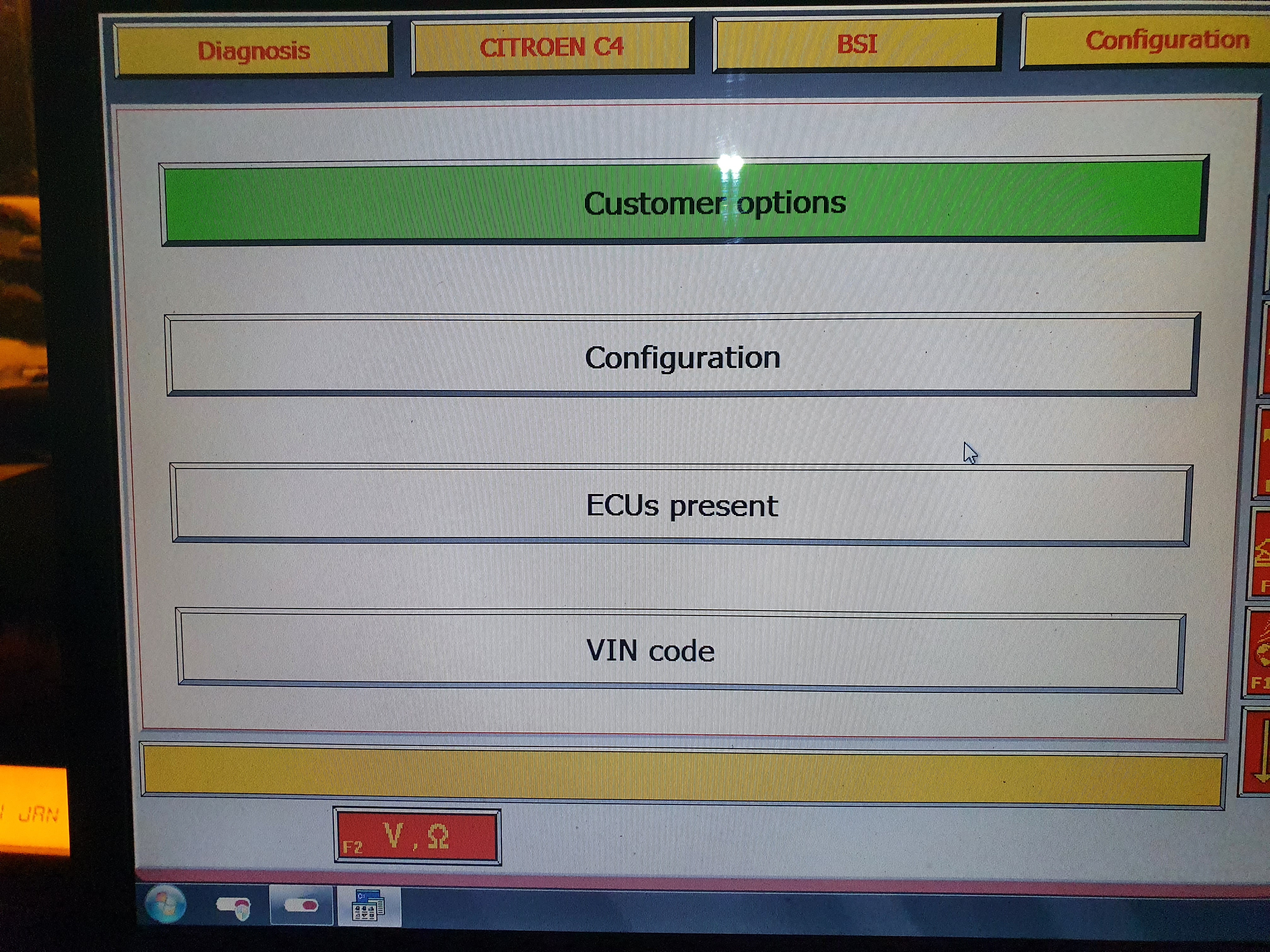
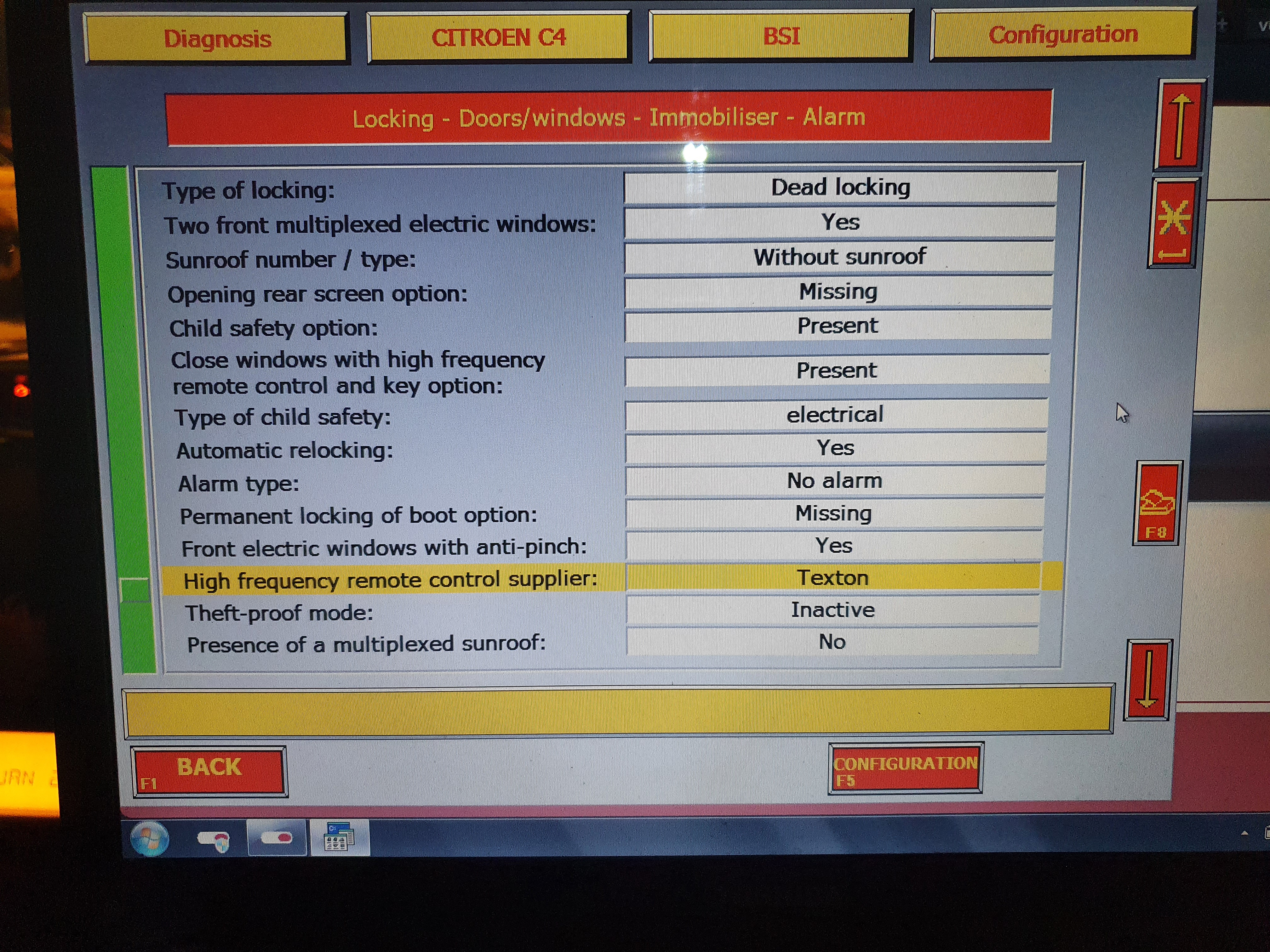
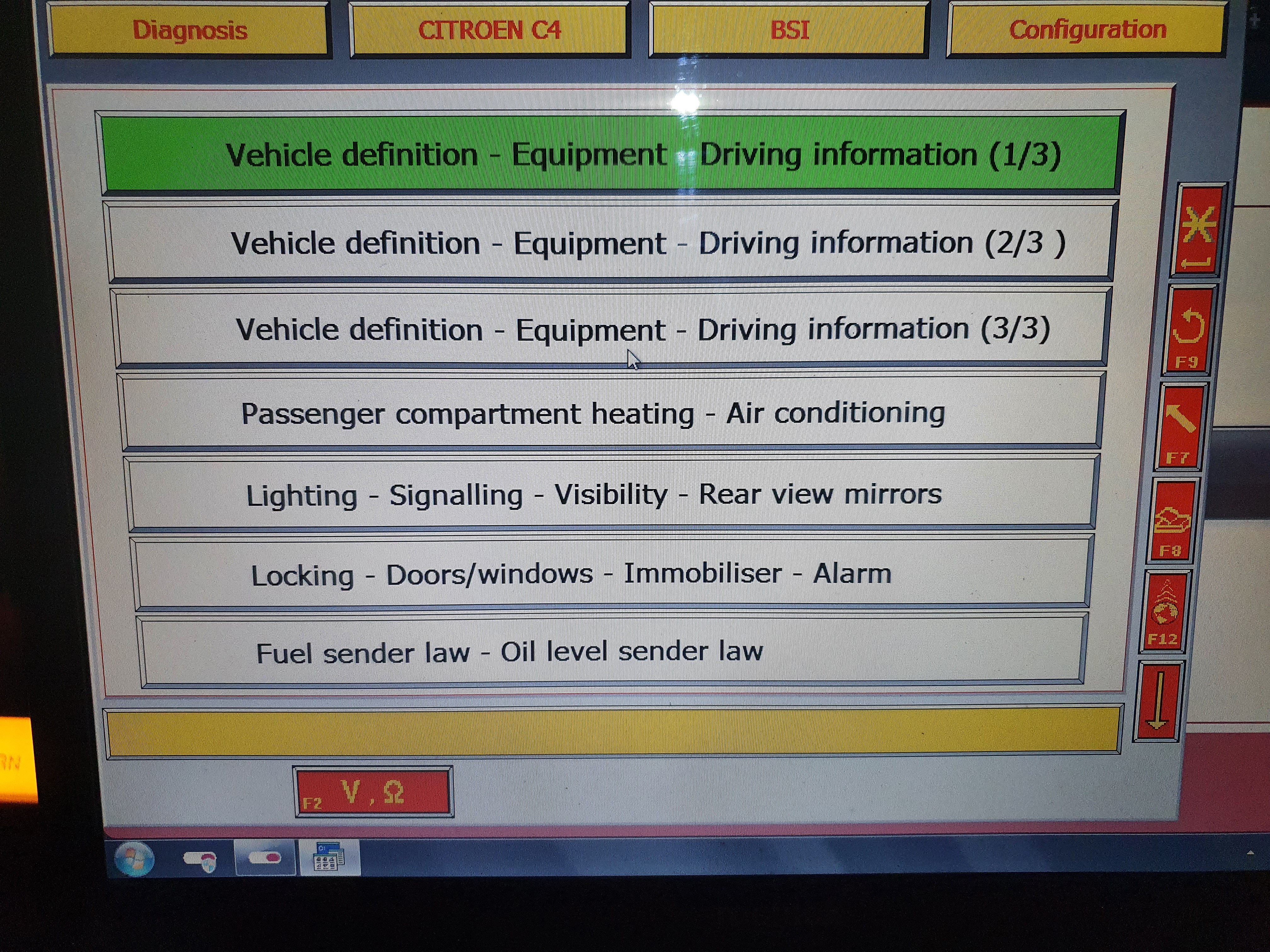
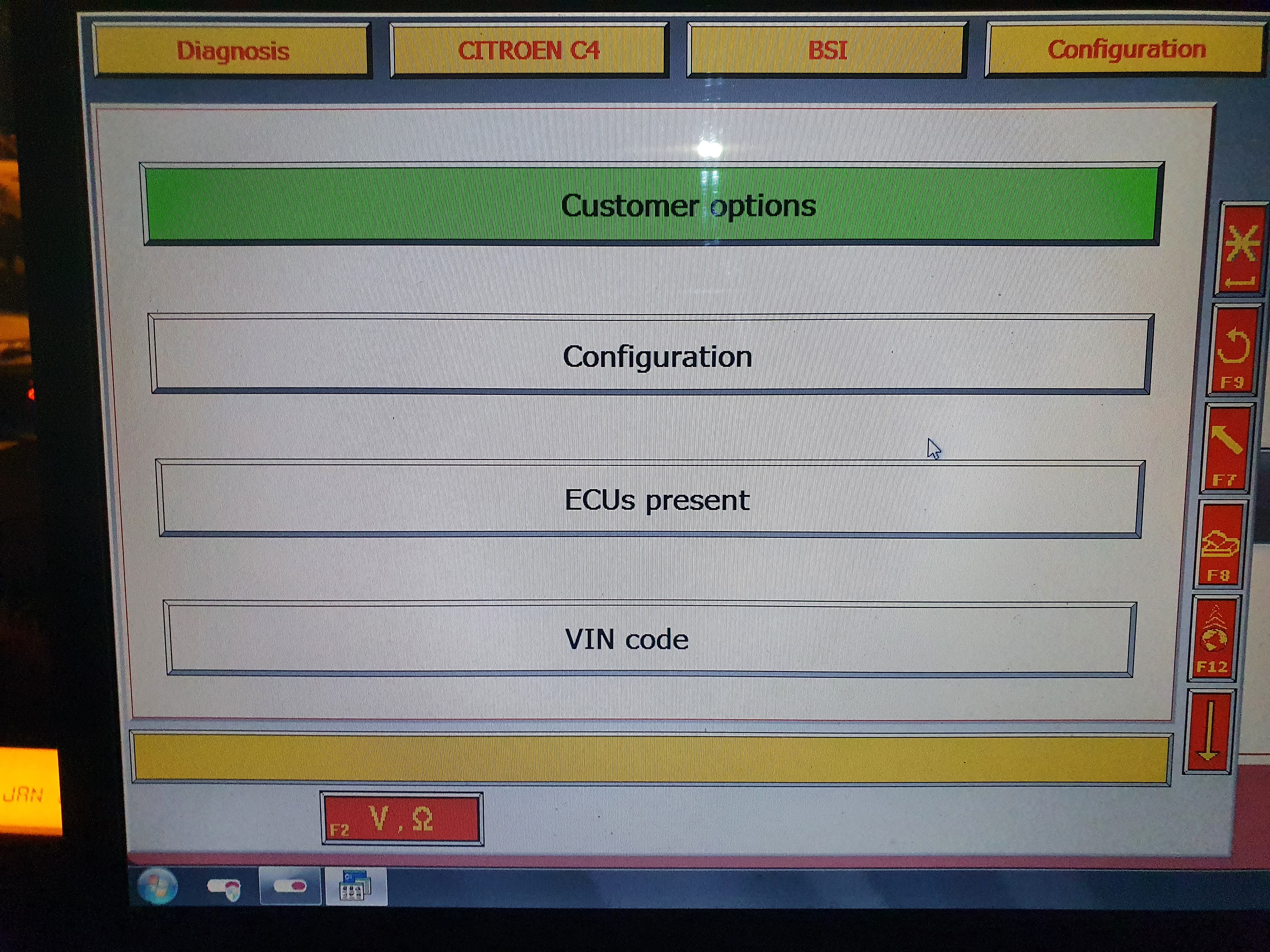
I tried to follow the video, but I either don't have the correct Lexia set up or something isn't right with my car :?

This is what I found....

Image

Image

Image

Image

I could "not" find any other options than what is in the photo's. No other options to code the keys or anything.

Not sure where to go from here :roll:
Has anyone seen the plot? :?
User avatar
GiveMeABreak
(Donor 2016)
Posts: 41989
Joined: 15 Sep 2015, 19:38
x 6956

Re: Replacement Key Info Required

Unread post by GiveMeABreak »

I don't think you followed the video I posted....

Run a Global Test first.
When it finishes, scroll back to the top onto the BSI which should be at the top of the list.
Then 'confirm' this selection to get to the next menus
Then scroll down until you find 'Programming'
Then from that menu, you should see the 'Key Programming' menu.

Just watch from time index 1:01 in the video I posted.
Please note, I'm no longer active on the Forum, so won't respond to messages.

Marc
User avatar
Doo
(Donor 2022)
Posts: 490
Joined: 09 Sep 2019, 16:53
x 121

Re: Replacement Key Info Required

Unread post by Doo »

I assure you I followed the video. I watched it about 4 times. I had it on my phone again as I sat in the car. Something came up about this car (or device....I can't remember, it was a few days ago now) is not supported or some such.

Perhaps I didn't wait long enough for the global test to finish!? I'll try again, but I may have to plug into another car for power to charge the laptop. I don't remember what I asked the computer to do, but everything switched off apart from the usual dash lamps. And when I say everything, I also mean the cigar lighter socket which I had plugged the laptop charger into.

All this on top of various other issues I am working through (life in general :roll: ) so it takes a while to get around to this and upload the result.

But thank you for taking time out to help a thicko with this :)
Has anyone seen the plot? :?
User avatar
GiveMeABreak
(Donor 2016)
Posts: 41989
Joined: 15 Sep 2015, 19:38
x 6956

Re: Replacement Key Info Required

Unread post by GiveMeABreak »

Ok, so first things first. Not a good idea to put your laptop into the car charger! That will as sure as day force the car to kick into economy mode and you do NOT want that happening during a programming session. If your car battery is also weakened, it's probably a good idea to give it a charge too, as that will determine how soon Economy mode kicks in.

I suggest you fully charge your laptop battery up before even attempting this - or preferably, if it's safe and weather permitting, use a weather proof extension.
You must allow the Global test to fully complete - it will try and communicate with all the ECUs on the car.
When it has finished, it will remove all the non-detected ECUs from the list.
Then you can scroll to the top and select the BSI and confirm
Then you should be able to see the menus or similar ones as mentioned.
Please note, I'm no longer active on the Forum, so won't respond to messages.

Marc
User avatar
Doo
(Donor 2022)
Posts: 490
Joined: 09 Sep 2019, 16:53
x 121

Re: Replacement Key Info Required

Unread post by Doo »

GiveMeABreak wrote: 25 Jan 2021, 11:42 Ok, so first things first. Not a good idea to put your laptop into the car charger! That will as sure as day force the car to kick into economy mode and you do NOT want that happening during a programming session. If your car battery is also weakened, it's probably a good idea to give it a charge too, as that will determine how soon Economy mode kicks in.

I suggest you fully charge your laptop battery up before even attempting this - or preferably, if it's safe and weather permitting, use a weather proof extension.
You must allow the Global test to fully complete - it will try and communicate with all the ECUs on the car.
When it has finished, it will remove all the non-detected ECUs from the list.
Then you can scroll to the top and select the BSI and confirm
Then you should be able to see the menus or similar ones as mentioned.
Thanks for that. Good news is the car battery is new. Replaced it a few weeks back when all the weird issues started appearing. Although, the car is still playing funny buggers with the clutch. I didn't believe my wife when she told me the car was "jumping" when or immediately as the engine started :? It happened to me the 1st time ever as I was cranking, the engine hadn't quite caught, but the car tried to leap forward!! I know it's a clutch thing (as if it hasn't disengaged) and I am wholly convinced it is to do with both the oil and the pressure sphere. That's an engine & box out job as the glow plugs need done, timing belt, timing chain and some gaskety bits which weep. I find it's much easier to do the work on a bench and engine stand than messing around under the bonnet and under the car... To sore for that carry on now [-X It'll get a new clutch and various other bits while it's apart. Have to say though, it's a fantastic car to drive and the paddle shifts are epic fun. I floor the throttle, wait until I feel the torque curve start to flatten, pull the upshift and lift my foot off the throttle at the same time, feel the shift and floor it. You don't "have" to lift off, but I think a little mechanical sympathy helps :-D The gearshifts are smooth and silent so I know the box itself is ok....

I digress.

So as far as the laptop is concerned, it's an old model (Toshiba Satellite) and even though it's a new battery, it was never a great long lasting thing. I'll need a very long lead as I live fifty feet up and about 24mtrs from where the car is parked #-o It's too wet to park on the grass too :snowman:

What I can doo ( :-D ) is plug into the Range Rover and use it to charge the laptop should it come to that.

But I believe I did interrupt a global test now that I think back to it.... It's all a bit old school compared to the new stuff. Last one I used was a Launch android code reader on the Rover. Touch screen, intuitive and basically simple. Sitting with a laptop takes me back :)

I'll find a moment to deal with it and report back.

Thank you for sticking with me while I wallow in stupidity =D>
Has anyone seen the plot? :?
Michel

Re: Replacement Key Info Required

Unread post by Michel »

Hell Razor5543 wrote: 16 Dec 2020, 15:16 Some locksmiths (Timpsons, possibly) can read the frequency of a key (they may charge a fee for this; I don't know) so you could take a known working key to them so they can let you know what frequency it operates on.
They can, they charge. Before 31st Dec they wanted £80 for a key, cut, programmed and ready to use for the C3 Picasso.

Gone up to £210 now, so I’ll continue unlocking it with the key!
User avatar
Paul-R
Moderating Team
Posts: 8995
Joined: 07 May 2009, 16:24
x 1868

Re: Replacement Key Info Required

Unread post by Paul-R »

Are you not game to try a Chinese key Mike?
As I get older I think a lot about the hereafter - I go into a room and then wonder what I'm here after.

Inside every old person is a young person wondering what the hell happened.

"Trying is the first step towards failure" ~ Homer J Simpson
Hell Razor5543
(Donor 2023)
Posts: 14266
Joined: 01 Apr 2012, 09:47
x 3277

Re: Replacement Key Info Required

Unread post by Hell Razor5543 »

Michel wrote: 09 Feb 2021, 10:06
Hell Razor5543 wrote: 16 Dec 2020, 15:16 Some locksmiths (Timpsons, possibly) can read the frequency of a key (they may charge a fee for this; I don't know) so you could take a known working key to them so they can let you know what frequency it operates on.
They can, they charge. Before 31st Dec they wanted £80 for a key, cut, programmed and ready to use for the C3 Picasso.

Gone up to £210 now, so I’ll continue unlocking it with the key!
Sometimes it's not what you know but who you know that helps. I am friends with the staff at one branch of Timpsons (I used to work with one guy there, and my brother used to work at that branch). Next time I go past (and when they are open) I can see what they can do for me, if that is of interest, Mike?
James
ex BX 1.9
ex Xantia 2.0HDi SX
ex Xantia 2.0HDi LX
ex C5 2.0HDi VTR
ex C5 2.0HDi VTR
ex C5 2.2HDi VTX+

Yes, I am paranoid, but am I paranoid ENOUGH?
Out amongst the stars, looking for a world of my own!