
I have a Peugeot RCZ with Magneti Marelli RT6 . The screen is becoming temperamental. Sometimes takes ages to load. Sometimes just hangs on Peugeot logo. Occasionally it just stays blank and once or twice the dash displays in Km instead of miles.
I have read about replacing the internal SD card . First step is to back up the existing SD. My question is - if I take it out, pop it in my laptop and back up the files, does windows write anything to the SD card? I know if a new, blank SD is put in a laptop windows will write system files to it , which will stop it working in the head unit. But Will Windows write system files to the original SD and stop it from working?
Back up micro SD
-
GiveMeABreak

- (Donor 2016)
- Posts: 41989
- Joined: 15 Sep 2015, 19:38
- x 6957
Re: Back up micro SD
Don't do this! If you do Windows will write hidden files to the card, that's why the guide is there (viewtopic.php?t=63227) - use the Mirascript Part A and later Part B to restore the configuration files when replacing the card.
You can use a batch file I wrote in Windows to remove the files when you come to format the new card. Windows will assign the card a drive letter when first inserted, so you use this when prompted by the batch file along with a colon (:) and when completed remove the card immediately afterwards.
Copy this code by clicking the CODE SELECT ALL and save it as 'SD Card Sys File Remover.bat' or whatever filename you want with the .bat extension.
You can use a batch file I wrote in Windows to remove the files when you come to format the new card. Windows will assign the card a drive letter when first inserted, so you use this when prompted by the batch file along with a colon (:) and when completed remove the card immediately afterwards.
Copy this code by clicking the CODE SELECT ALL and save it as 'SD Card Sys File Remover.bat' or whatever filename you want with the .bat extension.
Code: Select all
@echo off
set /p DriveLetter=Enter Drive Letter and ":" to remove System Volume Information Files and Folders.
%DriveLetter%
attrib -a -r -h -s "System Volume Information"
Rmdir "System Volume Information" /q /s
pause
Please note, I'm no longer active on the Forum, so won't respond to messages.
Marc
Marc
-
SteveH 700
- Posts: 2
- Joined: 12 Dec 2023, 19:16
- x 1
Re: Back up micro SD
Thanks, what I wanted to do is back up my configuration using mirascripts then put the SD card back in the head unit for now. But when I put the existing card in my laptop to back it up will it get hidden files written to it?
-
GiveMeABreak
- (Donor 2016)
- Posts: 41989
- Joined: 15 Sep 2015, 19:38
- x 6957
Re: Back up micro SD
Yes - guaranteed!
When you follow the Part A guide, there is no need to remove the SD card - you run Mirascripts on a USB and it does the extraction of the important files for you. Then you save the files somewhere safe on your PC that you can use to copy back to a USB and restore later if you need to - as in after your replace the SD card and after the firmware recreates the partitions and installs the operating system - which MAY result in loss of configuration.
Sounds like you've done this in reverse and removed the SD card already before running the Miracript Part A operation first in situ.
When you follow the Part A guide, there is no need to remove the SD card - you run Mirascripts on a USB and it does the extraction of the important files for you. Then you save the files somewhere safe on your PC that you can use to copy back to a USB and restore later if you need to - as in after your replace the SD card and after the firmware recreates the partitions and installs the operating system - which MAY result in loss of configuration.
Sounds like you've done this in reverse and removed the SD card already before running the Miracript Part A operation first in situ.
Please note, I'm no longer active on the Forum, so won't respond to messages.
Marc
Marc
-
DamirMitrovic

- Posts: 29
- Joined: 06 Apr 2022, 07:36
- x 4
Re: Back up micro SD
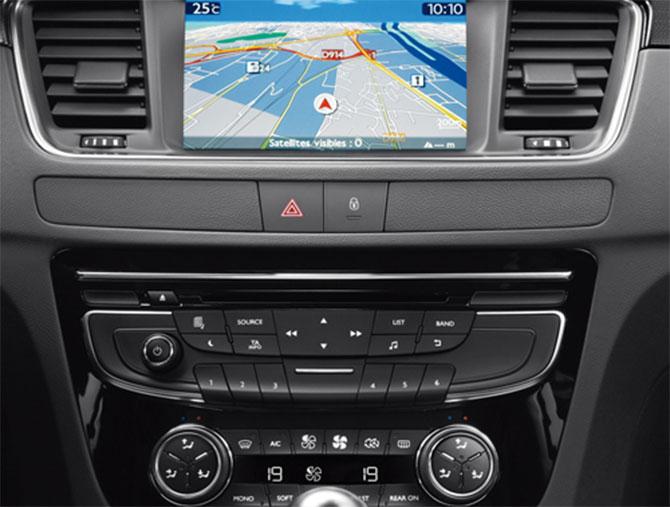
I have a Peugeot 508, model year 2011. Can someone send me the files from the microSD card? This is what my radio looks like NOT TOUCH DISPLAY:
-
Paul-R

- Moderating Team
- Posts: 9352
- Joined: 07 May 2009, 16:24
- x 1943
Re: Back up micro SD
The files backed up from the card will be different for each car the unit is fitted to. The process is about backing up to save the configuration from your own card.
Also, there no photo showing. See here for how to do this.
viewtopic.php?f=9&t=56795
Also, there no photo showing. See here for how to do this.
viewtopic.php?f=9&t=56795
As I get older I think a lot about the hereafter - I go into a room and then wonder what I'm here after.
Inside every old person is a young person wondering what the hell happened.
"Trying is the first step towards failure" ~ Homer J Simpson
Inside every old person is a young person wondering what the hell happened.
"Trying is the first step towards failure" ~ Homer J Simpson