
Hi everyone, I recently purchased a 1-year Connected Navigation Pack subscription for my Citroën C5 Aircross for TomTom traffic and services. The problem is that the 'status of connected services' remains unavailable and doesn't switch to 'activated'. The NAC unit seems unable to access the internet via my phone's hotspot/tethering. I have checked and confirmed that all data and location sharing permissions are fully enabled. Has anyone experienced this or found a fix?"
I receive error on Connected Services "no internet connection available"
NAC Unit No internet C5 AIRCROSS
-
mickthemaverick

- Forum Admin Team
- Posts: 21038
- Joined: 11 May 2019, 17:56
- x 8080
Re: NAC Unit No internet C5 AIRCROSS
Can you park the vehicle in a broadband based wifi area and try that? 
I used to be indecisive, now I'm not so sure!
I used to ride on two wheels, but now I need all four!
I used to ride on two wheels, but now I need all four!
-
owl
- Posts: 57
- Joined: 07 Oct 2025, 19:26
- x 7
Re: NAC Unit No internet C5 AIRCROSS
Well I tried also to connect it to my home wi-fi.Result is same. I have both SOS and Citroen Assistance button that means car have phsically sim-card. I wonder if there is kind of reset button or something?mickthemaverick wrote: 25 Aug 2026, 17:36 Can you park the vehicle in a broadband based wifi area and try that?
-
owl
- Posts: 57
- Joined: 07 Oct 2025, 19:26
- x 7
Re: NAC Unit No internet C5 AIRCROSS
Although it appears to be connected to Wi-Fi, the Connected Navigation Pack subscription I purchased is not showing up in my system. The “Status of connected services” is not becoming active. There seems to be a problem somewhere, but I can’t figure out what it is.
-
rui_saraiva

- Posts: 118
- Joined: 15 Feb 2023, 10:31
- x 59
Re: NAC Unit No internet C5 AIRCROSS
Is your infotainment system head unit the one fitted from the factory?
Could you please export your configuration (cog/hours, OPTIONS, System settings, System info, Export config)?
It should create 2 files in a FAT32-formatted USB flash drive, "instkey_xxxxxxxxxxxxxxxxxxxx.xml" and "packageslist_xxxxxxxxxxxxxxxxxxxx.txt", the x's in the filenames is your 20-digit UIN (Unique Identification Number)/serial number of the head unit.
Could you please send me your VIN (you might have to remove the first 3 characters or this forum will obfuscate the VIN) and your UIN?
Your head unit could have been replaced and the VIN-UIN pair information, stored in the PSA/Stellantis database, is no longer valid.
Could you please export your configuration (cog/hours, OPTIONS, System settings, System info, Export config)?
It should create 2 files in a FAT32-formatted USB flash drive, "instkey_xxxxxxxxxxxxxxxxxxxx.xml" and "packageslist_xxxxxxxxxxxxxxxxxxxx.txt", the x's in the filenames is your 20-digit UIN (Unique Identification Number)/serial number of the head unit.
Could you please send me your VIN (you might have to remove the first 3 characters or this forum will obfuscate the VIN) and your UIN?
Your head unit could have been replaced and the VIN-UIN pair information, stored in the PSA/Stellantis database, is no longer valid.
-
owl
- Posts: 57
- Joined: 07 Oct 2025, 19:26
- x 7
Re: NAC Unit No internet C5 AIRCROSS
Yes, fitted from the factory. My version was 31.09.46.62_NAC-r0. and at that time Citroen update offered me 17.0.0-r0rui_saraiva wrote: 04 Sep 2026, 00:10 Is your infotainment system head unit the one fitted from the factory?
Could you please export your configuration (cog/hours, OPTIONS, System settings, System info, Export config)?
It should create 2 files in a FAT32-formatted USB flash drive, "instkey_xxxxxxxxxxxxxxxxxxxx.xml" and "packageslist_xxxxxxxxxxxxxxxxxxxx.txt", the x's in the filenames is your 20-digit UIN (Unique Identification Number)/serial number of the head unit.
Could you please send me your VIN (you might have to remove the first 3 characters or this forum will obfuscate the VIN) and your UIN?
Your head unit could have been replaced and the VIN-UIN pair information, stored in the PSA/Stellantis database, is no longer valid.
So firmware installed version was3x.xx.xx.xx, but it was already identified as a NAC_EUR_WAVE4 system.
With your valuable help I installed the latest NAC Wave 4 firmware (44.07.33.32_NAC-r0) with 17.0.0.0 maps.
Now, citroen update offers me 42.03.33.42 but I already upgraded maps from 17.0.0.0 to newest 20.0.0.0
On the other hand, I purchased citroen connected navigation pack. But status of connected services' remains unavailable and doesn't switch to 'activated'
When I check the connection status, it shows that the system is connected to the internet, but the package I purchased is not appearing. When I click on the apps with the Citroen logo, it say “No internet connection.” There is also a single red line across the globe/web icon.
VIN: VR7**************[VIN obfuscated, can be read by forum staff] AC YHZ RLL 018090
UIN : 0D011C1271D4F2208D00
-
rui_saraiva
- Posts: 118
- Joined: 15 Feb 2023, 10:31
- x 59
Re: NAC Unit No internet C5 AIRCROSS
Your system is again identified as a NAC_EUR_WAVE3 with the 31.09.46.62_NAC-r0 firmware installed and the 10.0.0-r0 European maps (for the NAC_EUR_WAVE3). But none of this is related to your problem.
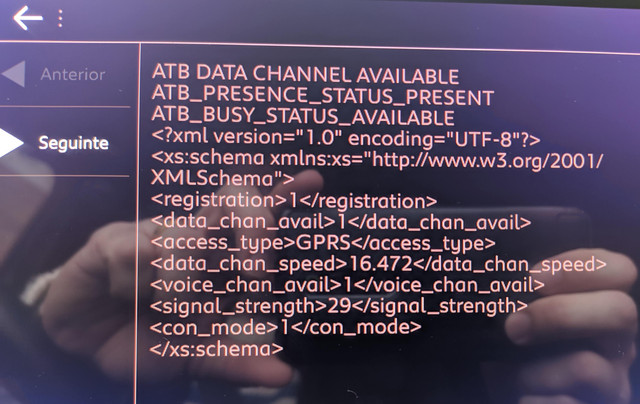
Another common problem is the BTA/ATB (Boitier Télématique Autonome/Autonomous Telematics Box) module itself that only supports old 2G networks (GPRS or EDGE mobile data). Most mobile operators are phasing out legacy 2G networks to reallocate frequency spectrum for faster 4G and 5G services.
In the "Engineering mode" (press and hold for 6 seconds the media/audio shortcut button):
- Insert the 1142 code, no output is shown;
- Insert the 1122 code, you should see a screen about the BTA/ATB connection.
Please post a photo with that screen.
Something like:
Another common problem is the BTA/ATB (Boitier Télématique Autonome/Autonomous Telematics Box) module itself that only supports old 2G networks (GPRS or EDGE mobile data). Most mobile operators are phasing out legacy 2G networks to reallocate frequency spectrum for faster 4G and 5G services.
In the "Engineering mode" (press and hold for 6 seconds the media/audio shortcut button):
- Insert the 1142 code, no output is shown;
- Insert the 1122 code, you should see a screen about the BTA/ATB connection.
Please post a photo with that screen.
Something like:
-
owl
- Posts: 57
- Joined: 07 Oct 2025, 19:26
- x 7
Re: NAC Unit No internet C5 AIRCROSS
Here it isrui_saraiva wrote: 04 Sep 2026, 17:50 Your system is again identified as a NAC_EUR_WAVE3 with the 31.09.46.62_NAC-r0 firmware installed and the 10.0.0-r0 European maps (for the NAC_EUR_WAVE3). But none of this is related to your problem.
Another common problem is the BTA/ATB (Boitier Télématique Autonome/Autonomous Telematics Box) module itself that only supports old 2G networks (GPRS or EDGE mobile data). Most mobile operators are phasing out legacy 2G networks to reallocate frequency spectrum for faster 4G and 5G services.
In the "Engineering mode" (press and hold for 6 seconds the media/audio shortcut button):
- Insert the 1142 code, no output is shown;
- Insert the 1122 code, you should see a screen about the BTA/ATB connection.
Please post a photo with that screen.
Something like:
- Attachments
-
-
rui_saraiva
- Posts: 118
- Joined: 15 Feb 2023, 10:31
- x 59
Re: NAC Unit No internet C5 AIRCROSS
Your car can't connect to the data channel of the mobile network, it seems you're affected by the 2G shutdown...
Did you try to tether your phone? You also have to enable the "mobile data sharing" (usually only the phone and audio streaming profiles are enabled) in the Bluetooth profile of the paired phone (phone shortcut button). This should work, but always requires a connected phone...
Did you try to tether your phone? You also have to enable the "mobile data sharing" (usually only the phone and audio streaming profiles are enabled) in the Bluetooth profile of the paired phone (phone shortcut button). This should work, but always requires a connected phone...
-
owl
- Posts: 57
- Joined: 07 Oct 2025, 19:26
- x 7
Re: NAC Unit No internet C5 AIRCROSS
Yes Rui. I tried many times connect via mobile phone. Both on my phone and infotainment screen shows that connected succesfully. I tried also to connect home wifi. I also tried to check SOS and citroen assistance button ( it worksrui_saraiva wrote: 04 Sep 2026, 19:39 Your car can't connect to the data channel of the mobile network, it seems you're affected by the 2G shutdown...
Did you try to tether your phone? You also have to enable the "mobile data sharing" (usually only the phone and audio streaming profiles are enabled) in the Bluetooth profile of the paired phone (phone shortcut button). This should work, but always requires a connected phone...
)I’ve checked now ‘My Citroen’ app and on the section of Connected Navigation Pack which I purchased, it is written “to use this pack you need to upgrade your software (which is offering now 42.03.33.42)
Most probably I will cancel subscription and look for refund.