

I have completed the conversion, and it all seems to be working. I will go back in with Diagbox later and double check the settings, as didn't have the recommended settings data with me when I first did the set-up.
To clarify what I did with the front panel, the RD45 came with a Citroen front panel, and was made by Continental, my RD4 had the glossy black panel that is special to the 308 CC and RCZ. My RD4 was made by VDO and although the major mechanical dimensions are the same, the internal details of the plastics and PCBs are significantly different. The multi-way connector between the front panel and head unit is identical, and in the same place. I ended up completely dismantling both panels, to swap the Mute button onto the RD4 panel, then fitted that panel (with the RD4 PCB and plastic-work) to the front of the RD45. Electrical compatibility has now been proven.
When first installed I tried disconnecting each antenna in turn, to check that they were both contributing, but found that there was no signal coming form the antenna with the grey connector. I repeated the test this morning, and both were able to provide a good signal. I think that during my first test, the tuner with the grey connector must have been doing a background RDS scan, and thus not listening to the station I had selected.
To reinforce what others have said, the bluetooth functionality requires that the NOMAD function be enabled in the EMF-C display configuration.
When I took out the trim above the windscreen to fit the microphone, I found that there was already a (vacant) connector for a microphone, so my car had been pre-wired for an external bluetooth box for the RD4. There is a spare blue connector below the glove box which I think may be the other end of that. I used the stand-alone microphone cable that I had ordered with the RD45, and although it cam with a connector 'B' for the quad-lock, I popped out the pins for the 2 wires and put them into the existing connector 'B' to retain the analogue Aux in (one thing I have not tested yet).
So I can now listne to music from the radio, the CD, the analogue input, the USB stick, or streamed from my phone. It can get a bit confusing. The bluetooth streaming quality seems OK BTW.
The Green "digital" antenna input on this RD45 is not much use for DAB (or anything else) because it has no centre pin, and is apparently not connected to anything inside the head unit.
RD45 upgrade for Peugeot 308
-
xantia_v6
- Forum Admin Team
- Posts: 10919
- Joined: 09 Nov 2005, 22:03
- x 1438
-
xantia_v6
- Forum Admin Team
- Posts: 10919
- Joined: 09 Nov 2005, 22:03
- x 1438
Re: RD45 upgrade for Peugeot 308
I have found one issue: There are now double warning beeps, e.g. from the parking sensors, one from the radio and one from the beeper in the dashboard. I am sure it is caused by some configuration error, but I can't see anything relevant.
[edit]
Fixed the double beep. there is a setting in the BSI to enable/disable parking sensor beeps from the controls under the steering wheel. That had got changed, probably when I attempted (unsuccessfully) to run the procedure to de-install the RD4.
[edit]
Fixed the double beep. there is a setting in the BSI to enable/disable parking sensor beeps from the controls under the steering wheel. That had got changed, probably when I attempted (unsuccessfully) to run the procedure to de-install the RD4.
-
xantia_v6
- Forum Admin Team
- Posts: 10919
- Joined: 09 Nov 2005, 22:03
- x 1438
Re: RD45 upgrade for Peugeot 308
For info, here are the screenshots of the bsi and rd45 configuration from my car
-
Andreipuia
- Posts: 4
- Joined: 19 Apr 2019, 20:39
Re: RD45 upgrade for Peugeot 308
Hi. I have done this change to my 308 from 2009 and i have a small issue with the microphone and aux1.
So i had RD4, with Type C display , and bought RD45 , and activated from Diagbox the BT function on the display. The seller coded the radio for me ( Vin no ) so i just plugged everything back on the car.
I can connect my phone to radio via BT , i can stream music from phone to radio , i can play music from USB device , but when i make a call via BT, the other person can`t hear me. I checked the rear of the RD45 in the B connector and i have 6 wires , which looks like they are AUX 1 and AUX 2. Pin 3 and pin 9 are empty. I opened the light cover from roof, and there i had an empty spot for the mic and 1 white connector for the mic. So i mounted original microphone in that hole and plugged the mic in the white spare connector. As i saw on previous page , from the roof the cables are going to A pillar in one connector , and then from there they are going into another Blue connector under the glove box. The question is , after the big blue connector from glove box where the cable is going ? I can`t see nothing behind the radio. Correct me if i am wrong : On the blue connector behind the glovebox ( where you open the fusebox cover , first blue connector from left side ) pin 17 and 18 should be from the mic on the roof. Pin 17 should go to Pin no 3 and pin 18 should go on pin 9 on the back of RD45 in B side. So i might have 2 situations. 1. In the blue connector pin 17 and 18 will be empty , or in pin 17 and 18 i will have cables which i won`t be able to trace them .
.
I wouldn't want to buy another mic with cable and route everything to RD45 unit.
So these are 2 problems i am facing with this upgrade. The mic i can understand for the moment why it does not work, but the AUX 1 should work because was working before.
Thank you.
So i had RD4, with Type C display , and bought RD45 , and activated from Diagbox the BT function on the display. The seller coded the radio for me ( Vin no ) so i just plugged everything back on the car.
I can connect my phone to radio via BT , i can stream music from phone to radio , i can play music from USB device , but when i make a call via BT, the other person can`t hear me. I checked the rear of the RD45 in the B connector and i have 6 wires , which looks like they are AUX 1 and AUX 2. Pin 3 and pin 9 are empty. I opened the light cover from roof, and there i had an empty spot for the mic and 1 white connector for the mic. So i mounted original microphone in that hole and plugged the mic in the white spare connector. As i saw on previous page , from the roof the cables are going to A pillar in one connector , and then from there they are going into another Blue connector under the glove box. The question is , after the big blue connector from glove box where the cable is going ? I can`t see nothing behind the radio. Correct me if i am wrong : On the blue connector behind the glovebox ( where you open the fusebox cover , first blue connector from left side ) pin 17 and 18 should be from the mic on the roof. Pin 17 should go to Pin no 3 and pin 18 should go on pin 9 on the back of RD45 in B side. So i might have 2 situations. 1. In the blue connector pin 17 and 18 will be empty , or in pin 17 and 18 i will have cables which i won`t be able to trace them
.I wouldn't want to buy another mic with cable and route everything to RD45 unit.
So these are 2 problems i am facing with this upgrade. The mic i can understand for the moment why it does not work, but the AUX 1 should work because was working before.
Thank you.
-
xantia_v6
- Forum Admin Team
- Posts: 10919
- Joined: 09 Nov 2005, 22:03
- x 1438
Re: RD45 upgrade for Peugeot 308
The microphne cable from the roof will be terminated at the connector which is there for the OEM hands-free kit. These wires would need to be extended to reach the RD45. I decided that it ws easier to buy and fit a complete microphone harness, although that requires re-pinning part of the quad-lock connector because the mic pins are adjacent to those for Aux 1.
The Aux 1 input option must be enabled in the RD45 configuration, and it probably isn't (as most cars have either USB or Aux 1 but not both)
The Aux 1 input option must be enabled in the RD45 configuration, and it probably isn't (as most cars have either USB or Aux 1 but not both)
-
Andreipuia
- Posts: 4
- Joined: 19 Apr 2019, 20:39
Re: RD45 upgrade for Peugeot 308
So the wires should be visible as a spare connector or they terminate in the big blue connector that has about 20 pins?
Also, as far as i remember from yesterday the aux1 was enabled in radio but still no sound comming through.
Thanks
Also, as far as i remember from yesterday the aux1 was enabled in radio but still no sound comming through.
Thanks
-
Andreipuia
- Posts: 4
- Joined: 19 Apr 2019, 20:39
Re: RD45 upgrade for Peugeot 308
Ok. Found the plug with 20 pins. Took the multimeter and checked the wire continuity from roof to that plug. And yes that's the plug. Pin 18 and 17 is the same as pin 1 and 3 from the roof plug. But the question is , where those wires goes ? Is a brown and green wire on pin 17 and 18.
EDIT: I removed the glovebox so i can trace the cables better. I found that from pin 17 and 18 the wires are going in a big loom of wires which goes behind the a/c controls and from same loom exits another 2 looms. 1 is going to hazzard lights , esp and lock/unlock doors and another one it goes to cd player. Then i followed more and i found a spare connector same type as the one that goes in hazzard lights controls but it seems that are other cables not the one from the mic.
I saw on previous page a wiring diagram but i think that is from cars fitted with rd45 because from the 20 pin connector underneath the glovebox it goes straight to part B in RD45. But for cars fitted with RD4 i understand the mic cables might go into an aditional bluetooth box but i couldn't find any diagram where that box should be mounted maybe i can find a spare connector somewhere there.
Thank you
EDIT: I removed the glovebox so i can trace the cables better. I found that from pin 17 and 18 the wires are going in a big loom of wires which goes behind the a/c controls and from same loom exits another 2 looms. 1 is going to hazzard lights , esp and lock/unlock doors and another one it goes to cd player. Then i followed more and i found a spare connector same type as the one that goes in hazzard lights controls but it seems that are other cables not the one from the mic.
I saw on previous page a wiring diagram but i think that is from cars fitted with rd45 because from the 20 pin connector underneath the glovebox it goes straight to part B in RD45. But for cars fitted with RD4 i understand the mic cables might go into an aditional bluetooth box but i couldn't find any diagram where that box should be mounted maybe i can find a spare connector somewhere there.
Thank you
- Attachments
-
-
-
-
-
-
-
Andreipuia
- Posts: 4
- Joined: 19 Apr 2019, 20:39
Re: RD45 upgrade for Peugeot 308
Hi guys ,
Here is an update.
I aborted the mission of finding the other end of wires comming out from pin 17 and 18.
I took an old pc , and i took the cable from power on L.E.D that is mounted on the motherboard. That cable has a 2 pin black connector so i used that connector to plug it in straight into the radio on pin 3 and 9. To plug this i had to remove the white plug with aux cables , so no more aux1 , but anyway wasn't working with the new rd45. Then i tapped into the wires coming out from pin 17 and 18 and voila ! Microphone working , crystal clear sound. If i will have time and effort to make it properly i will do it , but for the moment will be like this.
Another way to do it better would be to take out pins from aux 1 out , move them to pin 3 and 9 and the other end of wires which is in the glovebox i could have unplugged them from rca connector and tap them into pin 17 and 18 from 20 pin connector which is in same place ( glovebox ).
Here is an update.
I aborted the mission of finding the other end of wires comming out from pin 17 and 18.
I took an old pc , and i took the cable from power on L.E.D that is mounted on the motherboard. That cable has a 2 pin black connector so i used that connector to plug it in straight into the radio on pin 3 and 9. To plug this i had to remove the white plug with aux cables , so no more aux1 , but anyway wasn't working with the new rd45. Then i tapped into the wires coming out from pin 17 and 18 and voila ! Microphone working , crystal clear sound. If i will have time and effort to make it properly i will do it , but for the moment will be like this.
Another way to do it better would be to take out pins from aux 1 out , move them to pin 3 and 9 and the other end of wires which is in the glovebox i could have unplugged them from rca connector and tap them into pin 17 and 18 from 20 pin connector which is in same place ( glovebox ).
-
robertel99
- Posts: 39
- Joined: 21 Apr 2024, 19:47
- x 1
Re: RD45 upgrade for Peugeot 308
hey, dont mean to revive old thread, but just asking, was your rd4 somehow the 03 version? do you have a photo of the label? i am trying to swap fascias from rd4 to rd45 and its not fitting electrically, was wondering if its only the rd4 versions that worked with nomade v2 whose fascias you could interchange.
-
xantia_v6
- Forum Admin Team
- Posts: 10919
- Joined: 09 Nov 2005, 22:03
- x 1438
Re: RD45 upgrade for Peugeot 308
I dug out my old RD4 and the RD45 front panel:
-
robertel99
- Posts: 39
- Joined: 21 Apr 2024, 19:47
- x 1
Re: RD45 upgrade for Peugeot 308
thanks a whole lot, this is of much use for me.
-
psrkallez06
- Posts: 12
- Joined: 10 Jan 2026, 23:02
Re: RD45 upgrade for Peugeot 308
I just did this upgrade myself on my 308 2009. Bought a kit from aliexpress. Took out my rd4 and my type b display. Changed it to rd45 and type c display. Everything seems to work since the seller coded it to my VIN. But I noticed. The TA button is now mute (no problem). But i can't find any meny on how to disable or enable TA? Also the menu for automatic locking of doors is also gone. Is it something i can add with diagbox? Thanks!
-
shtu
- (Donor 2023)
- Posts: 255
- Joined: 09 Dec 2023, 16:19
- x 76
Re: RD45 upgrade for Peugeot 308
That's one of the newer Chinese units, have a look at the info here, https://frenchcarforum.co.uk/forum/view ... 56#p724956
The clone versions of Diagbox that us DIYers have access to wont talk to that head unit properly - I've alreay tried with 7.58 and 7.62.
It's probably possible wth a later Diagbox version, but those versions also require a connection to the PSA systems.
The clone versions of Diagbox that us DIYers have access to wont talk to that head unit properly - I've alreay tried with 7.58 and 7.62.
It's probably possible wth a later Diagbox version, but those versions also require a connection to the PSA systems.
-
psrkallez06
- Posts: 12
- Joined: 10 Jan 2026, 23:02
Re: RD45 upgrade for Peugeot 308
I can't really see if you answered my post or just posted in general? Haha
-
xantia_v6
- Forum Admin Team
- Posts: 10919
- Joined: 09 Nov 2005, 22:03
- x 1438
Re: RD45 upgrade for Peugeot 308
The RD45 menu in Diagbox allows for TA to be enabled:
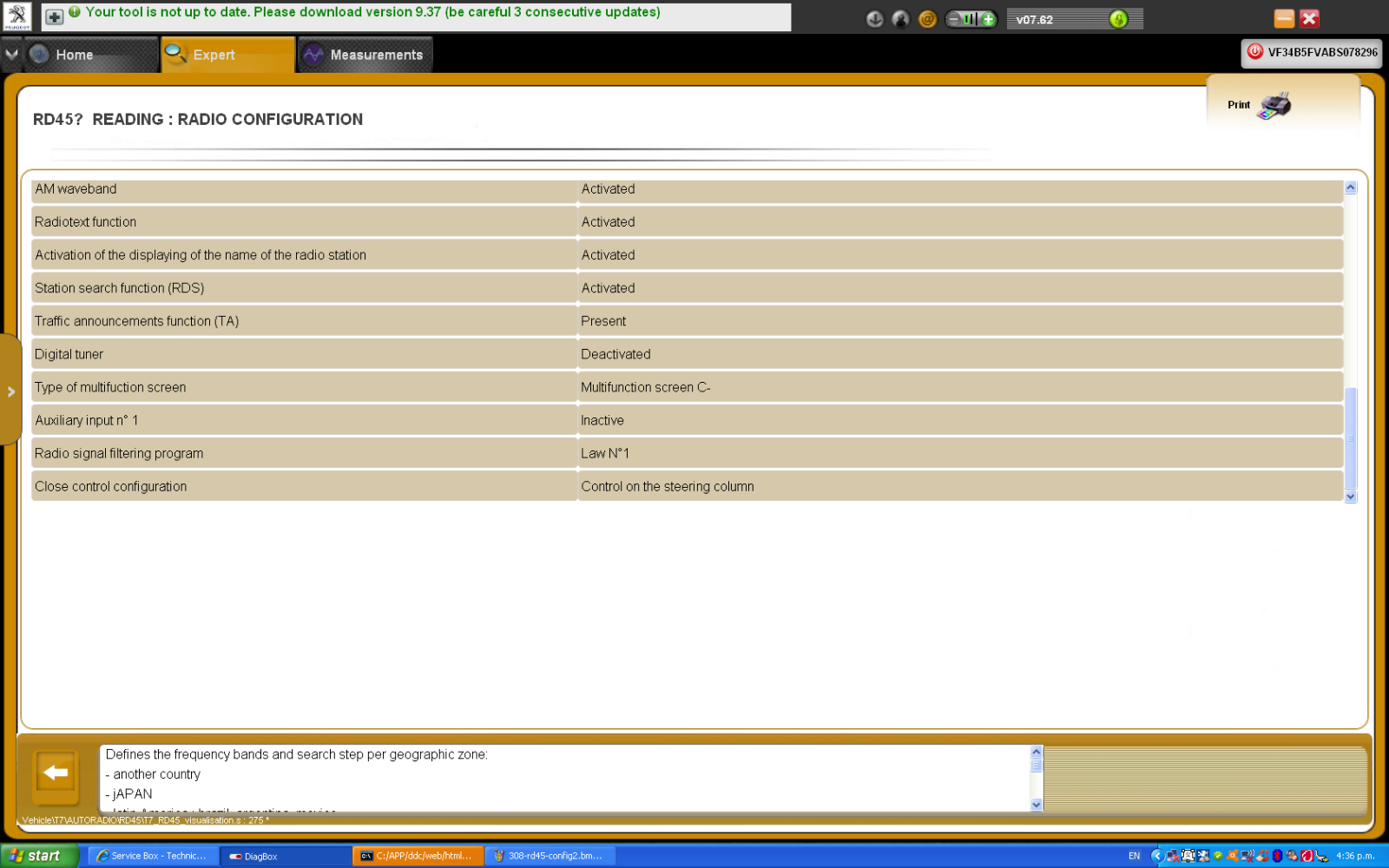
But I can't see anywhere on the user interface to control whether it is currently active, maybe it is a long press on one of the buttons? The answer is probably in the user manual for a car fitted with RD45.
I am not sure about the door locking, I think that would be in the configuration of the display module.
I just noticed that the screenshot above has an option for digital tuner, I don't think I ever tried that (there is no DAB in this country).
But I can't see anywhere on the user interface to control whether it is currently active, maybe it is a long press on one of the buttons? The answer is probably in the user manual for a car fitted with RD45.
I am not sure about the door locking, I think that would be in the configuration of the display module.
I just noticed that the screenshot above has an option for digital tuner, I don't think I ever tried that (there is no DAB in this country).