
Yes, that's the one I have - note the model on the unit as A 1281 Z - which has all the latest hardware and will be a revision 'C'. If you are going for a purchase (they ship internationally), make sure you ask Sharon in Sales for Diagbox V7.02 with updates to 7.58. Don't bother with Version 8, as there has been a lot of telecoding removed on later versions as they move over to having the coding done online at the Dealers - or Garages subscribing to the PSA programme at £1000s per year! Everything you need for cars to November 2015 is on Version 7.58 and includes full telecoding.TodiCroitor wrote:this is the one? http://www.easydiagnostics.co.uk/#/shop ... x/10636606GiveMeABreak wrote: At least with Easydiagnostics you have full backup support with .....
Merged Lexia & Diagbox threads
-
GiveMeABreak

- (Donor 2016)
- Posts: 41989
- Joined: 15 Sep 2015, 19:38
- x 6945
Re: Merged Lexia & Diagbox threads
Please note, I'm no longer active on the Forum, so won't respond to messages.
Marc
Marc
-
TodiCroitor

- Posts: 64
- Joined: 06 Jun 2016, 08:43
- x 4
Re: Merged Lexia & Diagbox threads
Awesome! Thanks!
Sent from my iPhone using Tapatalk
Sent from my iPhone using Tapatalk
-
GiveMeABreak
- (Donor 2016)
- Posts: 41989
- Joined: 15 Sep 2015, 19:38
- x 6945
Re: Merged Lexia & Diagbox threads
Hi John, it depends on what version you want / need. Versions are available from various locations on the web, but I have version 7. What version you can use is dependent upon your hardware and the revision of your Actia unit.john wrote:where can I download the lexia software? I've lost the disc so can install it on my new laptop

Here is my post with a link to the PSA Checker on my filestore with instructions. Post back what Revision you have and what version of firmware.

http://www.frenchcarforum.co.uk/forum/v ... 82#p482940
Please note, I'm no longer active on the Forum, so won't respond to messages.
Marc
Marc
-
john
- Posts: 308
- Joined: 15 May 2012, 08:34
- x 1
Re: Merged Lexia & Diagbox threads
hi, i get an error when clicking the download link
The file you are trying to download is no longer available.
This could be due to the following reasons:
The file has been removed because of a ToS/AUP violation.
Invalid URL - the link you are trying to access does not exist
The file has been deleted by the user.
The file you are trying to download is no longer available.
This could be due to the following reasons:
The file has been removed because of a ToS/AUP violation.
Invalid URL - the link you are trying to access does not exist
The file has been deleted by the user.
Citroen Xsara Picasso
Subaru Impreza WRX
Nissan Primastar
Subaru Impreza WRX
Nissan Primastar
-
GiveMeABreak
- (Donor 2016)
- Posts: 41989
- Joined: 15 Sep 2015, 19:38
- x 6945
Re: Merged Lexia & Diagbox threads
Hi John - Sorry about that - I take the links off periodically.
[Old Links Removed]
Edit: I've now (finally) managed to go back and update the original link, so that will stop others having the same issues - thanks for letting me know.
[Old Links Removed]
Edit: I've now (finally) managed to go back and update the original link, so that will stop others having the same issues - thanks for letting me know.
Last edited by GiveMeABreak on 09 Jun 2016, 18:47, edited 1 time in total.
Please note, I'm no longer active on the Forum, so won't respond to messages.
Marc
Marc
-
C5_Jack
- Posts: 137
- Joined: 01 Jan 2016, 13:54
Re: Merged Lexia & Diagbox threads
Hi Mark
I add a new sensor fitted to the nearside left tyre because I thought it stopped working.
How ever I still have the same problem as the sensor is not recognize.
Not sure what to do next
Jack
I add a new sensor fitted to the nearside left tyre because I thought it stopped working.
How ever I still have the same problem as the sensor is not recognize.
Not sure what to do next
Jack
-
TodiCroitor
- Posts: 64
- Joined: 06 Jun 2016, 08:43
- x 4
Re: Merged Lexia & Diagbox threads
It seems that they are out of stock. I was wondering if this is the same thing: http://www.ebay.co.uk/itm/REV-C-A-1281- ... Sw3ydVzN-wGiveMeABreak wrote:Yes, that's the one I have - note the model on the unit as A 1281 Z - which has all the latest hardware and will be a revision 'C'. If you are going for a purchase (they ship internationally), make sure you ask Sharon in Sales for Diagbox V7.02 with updates to 7.58. Don't bother with Version 8, as there has been a lot of telecoding removed on later versions as they move over to having the coding done online at the Dealers - or Garages subscribing to the PSA programme at £1000s per year! Everything you need for cars to November 2015 is on Version 7.58 and includes full telecoding.TodiCroitor wrote:this is the one? http://www.easydiagnostics.co.uk/#/shop ... x/10636606GiveMeABreak wrote: At least with Easydiagnostics you have full backup support with .....
-
GiveMeABreak
- (Donor 2016)
- Posts: 41989
- Joined: 15 Sep 2015, 19:38
- x 6945
Re: Merged Lexia & Diagbox threads
Haven't used them Todi, but this would appear to be the right model. Ask them what warranty they provide; they seem to have good reviews too.
Please note, I'm no longer active on the Forum, so won't respond to messages.
Marc
Marc
-
Fake Concern

- Posts: 1034
- Joined: 27 Dec 2012, 10:41
- x 65
Re: Merged Lexia & Diagbox threads
I'm back to ask more stupid questions! (from page 54)
I have updated the software on my Diagbox to V05.20. I tried again to enable the CD changer in my daughters Pug 207 and although the sofware told me that the installation was successful, it clearly wasn't as we still only have CD player and radio accessable from the source button.
I'm beginning to wonder if my version of Diagbox will ever work, could anyone direct me to a known working download or be willing to send me a disk with it on?
The other problem is that the XP laptop I have it installed on is very slow, is it worth me putting it on a faster laptop with Vista?
I have updated the software on my Diagbox to V05.20. I tried again to enable the CD changer in my daughters Pug 207 and although the sofware told me that the installation was successful, it clearly wasn't as we still only have CD player and radio accessable from the source button.
I'm beginning to wonder if my version of Diagbox will ever work, could anyone direct me to a known working download or be willing to send me a disk with it on?
The other problem is that the XP laptop I have it installed on is very slow, is it worth me putting it on a faster laptop with Vista?
Fake Concern, Volvo C30 T5 2011
Mrs Concern, Renault Moodus 1.6 Privilege 2004
Ms Concern No1, Pug 207 1.4 2008
Ms Concern No2, Citroen C4 VTS 2007
Mrs Concern, Renault Moodus 1.6 Privilege 2004
Ms Concern No1, Pug 207 1.4 2008
Ms Concern No2, Citroen C4 VTS 2007
-
GiveMeABreak
- (Donor 2016)
- Posts: 41989
- Joined: 15 Sep 2015, 19:38
- x 6945
Re: Merged Lexia & Diagbox threads
It won't be the software that is faulty - it is likely to be either that it needs coding in several places within Diagbox (within customer options / BSI / Head Unit section for example - I can't be specific as I haven't needed to code one of these, but often is the case that it needs changing in several palces - or the connections to the head unit aren't right - or the unit isn't compatible with the Head unit.
If you can connect to the Head unit, there should be options there to enable the CD Changer (i've assumed it is a compatible unit and it is connected to the rear of the head unit. Next try under the customer options sections and see if there is a section there, thirdly the BSI.
If you can connect to the Head unit, there should be options there to enable the CD Changer (i've assumed it is a compatible unit and it is connected to the rear of the head unit. Next try under the customer options sections and see if there is a section there, thirdly the BSI.
Please note, I'm no longer active on the Forum, so won't respond to messages.
Marc
Marc
-
Fake Concern
- Posts: 1034
- Joined: 27 Dec 2012, 10:41
- x 65
Re: Merged Lexia & Diagbox threads
I did it in Customer options where there was a section for installing CD changer. It said it was successfull, but only option for Radio and CD player appear with the source button.GiveMeABreak wrote:
If you can connect to the Head unit, there should be options there to enable the CD Changer (i've assumed it is a compatible unit and it is connected to the rear of the head unit. Next try under the customer options sections and see if there is a section there, thirdly the BSI.
Fake Concern, Volvo C30 T5 2011
Mrs Concern, Renault Moodus 1.6 Privilege 2004
Ms Concern No1, Pug 207 1.4 2008
Ms Concern No2, Citroen C4 VTS 2007
Mrs Concern, Renault Moodus 1.6 Privilege 2004
Ms Concern No1, Pug 207 1.4 2008
Ms Concern No2, Citroen C4 VTS 2007
-
GiveMeABreak
- (Donor 2016)
- Posts: 41989
- Joined: 15 Sep 2015, 19:38
- x 6945
Re: Merged Lexia & Diagbox threads
Will, what radio system is in the Pug? - I don't have service docs for Peugeot, but they share the same audio units. If I can compare with a similar Citroen one, I might be able to find if there are other programming areas.
Please note, I'm no longer active on the Forum, so won't respond to messages.
Marc
Marc
-
Fake Concern
- Posts: 1034
- Joined: 27 Dec 2012, 10:41
- x 65
Re: Merged Lexia & Diagbox threads
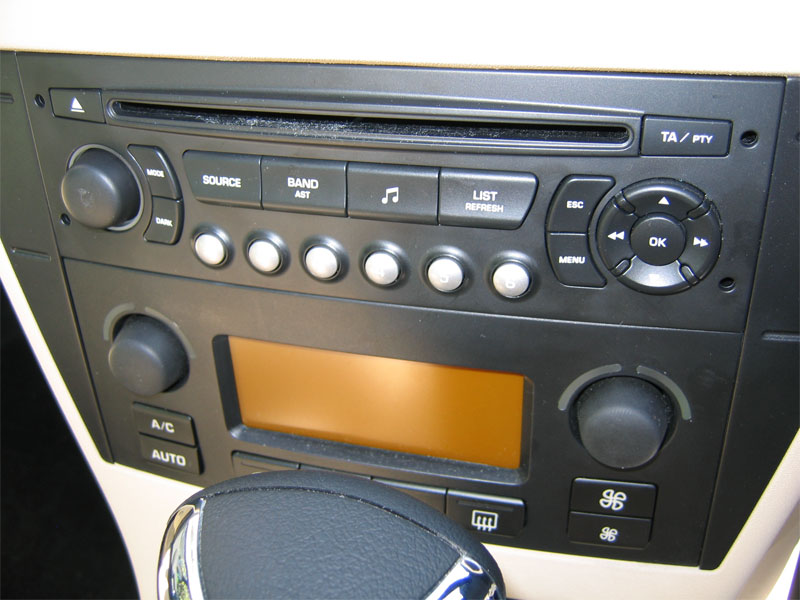
The 207 has the RD 4 the same as my C4 VTS except it doesn't seem to have the MP3 option like mine.
Fake Concern, Volvo C30 T5 2011
Mrs Concern, Renault Moodus 1.6 Privilege 2004
Ms Concern No1, Pug 207 1.4 2008
Ms Concern No2, Citroen C4 VTS 2007
Mrs Concern, Renault Moodus 1.6 Privilege 2004
Ms Concern No1, Pug 207 1.4 2008
Ms Concern No2, Citroen C4 VTS 2007
-
GiveMeABreak
- (Donor 2016)
- Posts: 41989
- Joined: 15 Sep 2015, 19:38
- x 6945
Re: Merged Lexia & Diagbox threads
Ok, got it, this is the RD4 as you say - same in our C3 too. There is a radio ECU that has a lot of parameters stored, including whether there is a CD Changer.
So if you run a Global Test first, then when finished, from the available ECUs detected in the list, find the one for the RD4.
Select this and confirm selection.
This should open up a menu where there should be options 'Configuration' or 'Parameters' or similar.
You'll know when you have it as it will show the Vehicle VIN, Geographical area of use, CD Changer or USB BOX, Fader Function, AM Waveband, Volume Automatic Control, Hi Fi Amplifier, etc., etc., This is the other option I referred to earlier to change the CD Changer USB BOX to 'Present'.
So if you run a Global Test first, then when finished, from the available ECUs detected in the list, find the one for the RD4.
Select this and confirm selection.
This should open up a menu where there should be options 'Configuration' or 'Parameters' or similar.
You'll know when you have it as it will show the Vehicle VIN, Geographical area of use, CD Changer or USB BOX, Fader Function, AM Waveband, Volume Automatic Control, Hi Fi Amplifier, etc., etc., This is the other option I referred to earlier to change the CD Changer USB BOX to 'Present'.
Please note, I'm no longer active on the Forum, so won't respond to messages.
Marc
Marc
-
johnaaronrose
- Posts: 1
- Joined: 18 Jun 2016, 20:12
Re: Merged Lexia & Diagbox threads
I previous installed DiagBox from an eBay's vendor's DVD which contained all the Updates from V7.02 onwards a .iso file (i.e. the DVD image) for v7.02 setup. I burned the .iso file to a blank DVD. I then used that DVD to run the setup program. It installed correctly after a long time under Windows XP with me telling the AVG firewall to allow all (just a few) files. I activated DiagBox using the manual method with customer code 1234567, the filled in boxes left alone, and the * boxes entered. After activation completed, it said 'Internet updates' failed to load, so I closed DiagBox, copied C:\AWRoot\bin\fi\APPDIAG.SYS to a safe place and ran DiagBox program again (i.e. the new program that Windows XP spotted). The following happened:
It checked Comms followed by Verification of Activation before displaying a window saying "Access to the vehicle communication card inoperable, validate to try again or Cancel to ignore": trying again gave the same.
I then tried to uninstall DiagBox (using the program setup by the install procedure) in order to follow the tutorial on this site. But it crashed: screen shot available. Any ideas on what to do?
PS I've tried to install DiagBox 7.02 by following the tutorial http://www.lesamisdudiag.com/diagbox/67 ... ox-v7.html but that crashes: screenshot available.
It checked Comms followed by Verification of Activation before displaying a window saying "Access to the vehicle communication card inoperable, validate to try again or Cancel to ignore": trying again gave the same.
I then tried to uninstall DiagBox (using the program setup by the install procedure) in order to follow the tutorial on this site. But it crashed: screen shot available. Any ideas on what to do?
PS I've tried to install DiagBox 7.02 by following the tutorial http://www.lesamisdudiag.com/diagbox/67 ... ox-v7.html but that crashes: screenshot available.