
Computer operating systems
-
myglaren

- Forum Admin Team
- Posts: 28725
- Joined: 02 Mar 2008, 13:30
- x 5672
Re: Computer operating systems
Perhaps Bill will come back and steer them onto the right track.
-
Xaccers

- Posts: 7654
- Joined: 07 Feb 2007, 23:46
- x 188
Re: Computer operating systems
Oh we can hope!myglaren wrote:Perhaps Bill will come back and steer them onto the right track.
1.9TD+ SX Xantia Estate (Cassy) running on 100% veg
1.9TD SX Xantia Hatchback (Jenny) running on 100% veg for sale
Laguna II 2.0dCi Privilege (Monty)
DIY sphere tool
1.9TD SX Xantia Hatchback (Jenny) running on 100% veg for sale
Laguna II 2.0dCi Privilege (Monty)
DIY sphere tool
-
Northern_Mike
Re: Computer operating systems
We are buying ever more Windows Servers. Mostly to host VMware , granted, but we're moving away from Solaris/Unix/Linux.Ben82 wrote:Server market, definitely... Desktop, I doubt it.CitroJim wrote:Unix and/or Linux will win out in the end..
The usefulness of Windows Server in the workplace has severely diminished over the past few years. Google Apps for Businesses has seen to that. Most companies I have visited recently, you notice that they're no longer using Exchange+Outlook, but have Gmail with their logo etc.
Windows Server has been reduced to user authentication, and possibly DHCP/DNS. Things that you could probably set up a Raspberry Pi to do.
All our mail services have just been migrated to Exchange 2010.
Cloud? Here? Not possible..
-
spider

- Posts: 3949
- Joined: 05 Jan 2010, 14:28
- x 77
Re: Computer operating systems
Seems to me (as I may of said elsewhere if not here) Win8 feels like it was meant for tablets / laptops and devices with touch screens.
It does not in my opinion sit nicely with a traditional desktop. I've tried for nearly six months and not happy. I see they have said its addressed in 8.1, I forget the words I'd have to check the mail to find out.
I still do not have any "apps" so apparently I can't upgrade as its via the Store, so I missed out on the free 'media' upgrade they offered too. It does not work, they suggested a "refresh" but would not be certain all my data would survive as I have a lot of stuff outside the "specified" MS directories. I said if I wanted to do that I'd do a backup and a fresh install (it was a 7Pro to 8Pro upgrade)
To be honest if it was not the 14.99 offer I'd not of bothered as once I'd tweaked 7 (which I did not like either initially) to behave more like XP it was fine.
Many issues with 8 still none serious but there are some mighty annoying ones, especially window sizes 'forgetting' themselves.
It does not in my opinion sit nicely with a traditional desktop. I've tried for nearly six months and not happy. I see they have said its addressed in 8.1, I forget the words I'd have to check the mail to find out.
I still do not have any "apps" so apparently I can't upgrade as its via the Store, so I missed out on the free 'media' upgrade they offered too. It does not work, they suggested a "refresh" but would not be certain all my data would survive as I have a lot of stuff outside the "specified" MS directories. I said if I wanted to do that I'd do a backup and a fresh install (it was a 7Pro to 8Pro upgrade)
To be honest if it was not the 14.99 offer I'd not of bothered as once I'd tweaked 7 (which I did not like either initially) to behave more like XP it was fine.
Many issues with 8 still none serious but there are some mighty annoying ones, especially window sizes 'forgetting' themselves.
Andy.
91 205D-Turbo, gone but still missed
02 106D, TUD5B, gone but not really missed apart from the MPG
91 205D-Turbo, gone but still missed
02 106D, TUD5B, gone but not really missed apart from the MPG
-
Xaccers
- Posts: 7654
- Joined: 07 Feb 2007, 23:46
- x 188
Re: Computer operating systems
Some of our clients have found out the offer to install W7 and then upgrade to W8 later had a deadline that ran out earlier this year so they'll have to buy W8 again unless we can shout enough on their behalf. I hope we can't and they stick with W7 for as long as possible.
1.9TD+ SX Xantia Estate (Cassy) running on 100% veg
1.9TD SX Xantia Hatchback (Jenny) running on 100% veg for sale
Laguna II 2.0dCi Privilege (Monty)
DIY sphere tool
1.9TD SX Xantia Hatchback (Jenny) running on 100% veg for sale
Laguna II 2.0dCi Privilege (Monty)
DIY sphere tool
-
Ben82

- Posts: 1086
- Joined: 03 Dec 2012, 07:47
- x 7
Re: Computer operating systems
That's probably your issue to be honest. Windows 8 becomes a lot easier if you got used to features of Windows 7/Vista... e.g Vista's "press the windows key then type the program you want", has been very much enhanced in 8.spider wrote: once I'd tweaked 7 (which I did not like either initially) to behave more like XP it was fine.
I was one that loved the Windows 7 Superbar, used to use ViGlance when I was stuck with XP at work (although buggy I felt it worked better than the XP taskbar!)...
On Windows 7 I found Bins, which made it even better for me. (Have yet to install it on Windows 8, as it's more useful when I'm working (e.g. needing multiple browsers).
Not had the Windows sizes being forgotten, maybe fixed in an update?
BTW, if you think 8.1 will bring back your beloved Start menu, it's not.. it's bringing back the start button, which will bring up the "start screen". (but there are alternatives).
2004 Citroen C5 3L V6 Auto
Brit living in Sweden with an imported from Germany French Car!
Brit living in Sweden with an imported from Germany French Car!
-
Northern_Mike
Re: Computer operating systems
One thing that gets my goat in Windows 7 - the "tile windows horizontally" thing on the taskbar no longer seems to do what it should.
Example - I use netbackup, running off 4 master servers, to monitor the backups. On XP, I can open a separate NBU window for each one, , then "tile windows horizontally" and I get 4 nice, equal windows, each taking up a 1/4 of the screen. Windows 7 - this simply doesn't work, and I've no idea why. I end up having to size the windows manually.
I do have dual screens, but it works ok with XP, and all the drivers are up to date. It's a standard HP workstation.
Example - I use netbackup, running off 4 master servers, to monitor the backups. On XP, I can open a separate NBU window for each one, , then "tile windows horizontally" and I get 4 nice, equal windows, each taking up a 1/4 of the screen. Windows 7 - this simply doesn't work, and I've no idea why. I end up having to size the windows manually.
I do have dual screens, but it works ok with XP, and all the drivers are up to date. It's a standard HP workstation.
-
Ben82
- Posts: 1086
- Joined: 03 Dec 2012, 07:47
- x 7
Re: Computer operating systems
Mike, does this work?
http://www.howtogeek.com/howto/11073/st ... windows-7/" onclick="window.open(this.href);return false;
Seems with the redesigned task manager in Windows 8, that feature has gone walkies though.
http://www.howtogeek.com/howto/11073/st ... windows-7/" onclick="window.open(this.href);return false;
Seems with the redesigned task manager in Windows 8, that feature has gone walkies though.
2004 Citroen C5 3L V6 Auto
Brit living in Sweden with an imported from Germany French Car!
Brit living in Sweden with an imported from Germany French Car!
-
Xaccers
- Posts: 7654
- Joined: 07 Feb 2007, 23:46
- x 188
Re: Computer operating systems
What annoys me is how much information gets removed from Windows Explorer as the version number increases.
Back on 2003 for example, open Windows Explorer and straight away it tells you how much space the files in the folder take up and helpfully tells you how much free space there is on the disk. If you select a range of files and happen to include a folder, it still tells you how much space the files take up.
Jump to W7 and do the same, well you get told how many files there are in the folder. That's it. Select a few and it does add their sizes up, but if you happen to include a folder in your selection then it no longer gives you the size, but if you click on Show more details you get to see the range of dates the contents were modified. Wow. So useful!
The whole hit the windows key and type the program's name would be fine if it was an addition to the XP/Vista start menu, but when the program list is so awkward to use that typing is the quickest way to open a program, something is seriously wrong with the GUI.
Especially when you have a user base that has spent years getting the Windows and Office version numbers mixed up (how many times have you been told by someone they use Windows 97 or 2010?) and don't know the names of the programs they use.
Back on 2003 for example, open Windows Explorer and straight away it tells you how much space the files in the folder take up and helpfully tells you how much free space there is on the disk. If you select a range of files and happen to include a folder, it still tells you how much space the files take up.
Jump to W7 and do the same, well you get told how many files there are in the folder. That's it. Select a few and it does add their sizes up, but if you happen to include a folder in your selection then it no longer gives you the size, but if you click on Show more details you get to see the range of dates the contents were modified. Wow. So useful!
The whole hit the windows key and type the program's name would be fine if it was an addition to the XP/Vista start menu, but when the program list is so awkward to use that typing is the quickest way to open a program, something is seriously wrong with the GUI.
Especially when you have a user base that has spent years getting the Windows and Office version numbers mixed up (how many times have you been told by someone they use Windows 97 or 2010?) and don't know the names of the programs they use.
1.9TD+ SX Xantia Estate (Cassy) running on 100% veg
1.9TD SX Xantia Hatchback (Jenny) running on 100% veg for sale
Laguna II 2.0dCi Privilege (Monty)
DIY sphere tool
1.9TD SX Xantia Hatchback (Jenny) running on 100% veg for sale
Laguna II 2.0dCi Privilege (Monty)
DIY sphere tool
-
myglaren
- Forum Admin Team
- Posts: 28725
- Joined: 02 Mar 2008, 13:30
- x 5672
Re: Computer operating systems
Not quite the same thing but Ubuntu has recently stared doing this:Northern_Mike wrote:One thing that gets my goat in Windows 7 - the "tile windows horizontally" thing on the taskbar no longer seems to do what it should.
Example - I use netbackup, running off 4 master servers, to monitor the backups. On XP, I can open a separate NBU window for each one, , then "tile windows horizontally" and I get 4 nice, equal windows, each taking up a 1/4 of the screen. Windows 7 - this simply doesn't work, and I've no idea why. I end up having to size the windows manually.
I do have dual screens, but it works ok with XP, and all the drivers are up to date. It's a standard HP workstation.
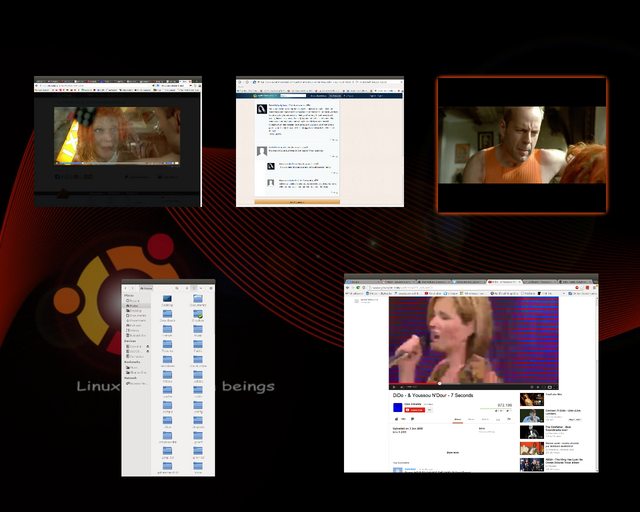
If you shove the cursor to a certain position, in my case top right but that can be changed,
Linux Mint does a similar thing but shows all extant desktops instead. Click one to enlarge it.
I like the option of multiple desktops so you can keep your crap somewhat more organised. Not that I will ever resemble organised

Not on a Mint machine at the moment but will edit it in later for illustrative purposes.
Yes, I WAS watching The 5th Element

-
Northern_Mike
Re: Computer operating systems
Ben82 wrote:Mike, does this work?
http://www.howtogeek.com/howto/11073/st ... windows-7/" onclick="window.open(this.href);return false;
Seems with the redesigned task manager in Windows 8, that feature has gone walkies though.
Yes! Thanks ever so much Ben, it's been driving me potty! Excellent!
Well pleased with that!
-
myglaren
- Forum Admin Team
- Posts: 28725
- Joined: 02 Mar 2008, 13:30
- x 5672
Re: Computer operating systems
It appears that Mint won't take a screenshot of the multiple desktops, only the active one.
It is similar but not the same as this:
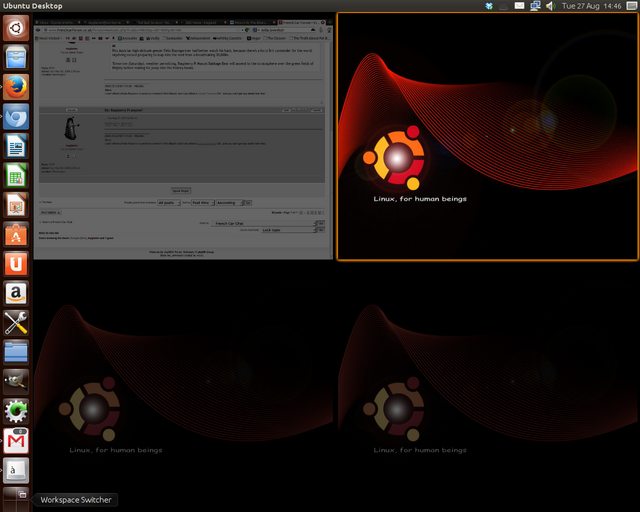
It is similar but not the same as this:
-
myglaren
- Forum Admin Team
- Posts: 28725
- Joined: 02 Mar 2008, 13:30
- x 5672
-
CitroJim

- A very naughty boy
- Posts: 55111
- Joined: 30 Apr 2005, 23:33
- x 8406
Re: Computer operating systems
Excellent, looking forward to that one Steve..
Jim
A bit of a Citroen AX fan...
A bit of a Citroen AX fan...
-
Xaccers
- Posts: 7654
- Joined: 07 Feb 2007, 23:46
- x 188
Re: Computer operating systems
Upgrading to the next version of Android....

1.9TD+ SX Xantia Estate (Cassy) running on 100% veg
1.9TD SX Xantia Hatchback (Jenny) running on 100% veg for sale
Laguna II 2.0dCi Privilege (Monty)
DIY sphere tool
1.9TD SX Xantia Hatchback (Jenny) running on 100% veg for sale
Laguna II 2.0dCi Privilege (Monty)
DIY sphere tool